Frequently Asked Questions
Short answers to common questions about Realistic Car Controller V6.0.0, each with a link to the chapter that covers it. For error messages and things that don't work as expected, see Troubleshooting.
General
Which version is current, and which Unity versions are supported?
V6.0.0, a Long-Term Support release (Unity compatibility and bug fixes, no new systems). It supports Unity 6.0 – 6.6 with the Built-in, URP or HDRP pipeline. See Overview & Features.
Which render pipelines work?
Built-in, URP and HDRP. For URP and HDRP, run the Render Pipeline Converter once after importing. See Render Pipelines.
Which platforms can I build for?
Desktop, and Android / iOS with RCC's touch controls. Customization saves are also written reliably on WebGL. See Mobile Setup and Customization.
How is RCC different from RCC PRO?
RCC is the beginner-friendly vehicle controller. RCC PRO is a separate product; the two don't share code or prefabs.
Is the source code included?
Yes. All runtime and editor scripts are included as C# source in Scripts/ and Editor/.
Should I edit RCC's scripts?
You can, but updating RCC replaces its folder, so your edits would be lost. Add behavior from your own scripts instead, using Events, Override Inputs or the Scripting API.
Where are the docs inside Unity?
Tools → BoneCracker Games → Realistic Car Controller → Help → Documentation (Offline), or the Documentation (Offline HTML) button on the Welcome Window's DOCS tab. The Welcome tab's Open Documentation button opens them too.
Installation & Updating
What do I need before importing?
The Input System package, with Active Input Handling set to Input System Package (New) or Both. See How to Install RCC.
Materials are pink or I get compile errors after importing.
See Troubleshooting and Render Pipelines.
How do I update from V5?
Back up, delete Assets/RealisticCarControllerV4/, import V6.0.0, then re-run the Render Pipeline Converter (URP / HDRP) and re-import the addons you use. No scripting API was removed or renamed. See How to Install RCC.
Why does Unity 6.6 show "Missing Signature" when I import RCC's shader or addon packages?
This is expected. Click Import Anyway. See How to Install RCC.
Vehicles
How do I make my own car drivable?
Select your model's root and open Tools → BoneCracker Games → Realistic Car Controller → Quick Vehicle Setup Wizard. See How to Create New Vehicles.
How do I use a demo car in my own scene?
Drag a prefab from Prefabs/Vehicles/ onto a ground with a collider, then add the RCC Camera. See Quick Start.
Do I need to tag my car "Player"?
No. The last spawned non-AI vehicle becomes the player vehicle automatically, or call RCC.RegisterPlayerVehicle(vehicle). See How the System Works.
What mass should my car have?
New vehicles get 1370 kg (from RCC_InitialSettings). Change it on the Rigidbody. See Vehicle Inspector Reference.
Can a vehicle have more than 4 wheels?
Yes. Turn on Extra Wheels in the Wheels tab and assign the extra rear wheel models and colliders. See Vehicle Inspector Reference.
Can I make a motorcycle?
No. The controller expects front-left, front-right, rear-left and rear-right wheels (plus optional extra rear wheels).
How do I tow a trailer?
Add an RCC_TrailerAttachPoint to the vehicle and to the trailer, then back into the trailer to attach it. T detaches it. The RCC_City demo has two trailers to try. See Vehicle Inspector Reference and Demo Scenes.
Driving Feel
How do I make driving more arcade or more drifty?
Turn on a behavior preset: Balanced, Racing, Drift, Semi Arcade or Fun. From code: RCC.SetBehavior(2) for Drift (index 0–4 in that order). See Behavior Presets.
Can one vehicle keep its own settings while a preset is on?
Yes. Tick Ignore Global Behavior Preset at the top of its inspector. See Behavior Presets.
How do I fix understeer or oversteer?
Tune the wheels' friction and stiffness. See How WheelColliders Work and Vehicle Inspector Reference.
Camera
How do I add a camera that follows my car?
Tools → BoneCracker Games → Realistic Car Controller → Create → Cameras → Add RCC Camera To Scene. It follows the player vehicle. See Camera System.
Do I have to delete Unity's Main Camera?
No. Add RCC Camera To Scene offers to disable the other cameras and AudioListeners instead. Ctrl+Z undoes it. See Camera System.
Changed in V6: earlier versions required deleting the Main Camera.
Can I use the gamepad right stick for the camera?
Yes. The right stick orbits the camera in TPS and hood modes. Turn it off with Use Gamepad Orbit on the RCC Camera. See Camera System.
New in V6.
Does the camera avoid walls?
Yes, with Use Occlusion (on by default). If it still clips, see Camera System and Troubleshooting.
Input & Controllers
What are the default controls?
See the controls table in Input System.
How do I rebind a key or button?
Open Resources/RCC_InputActions.inputactions, change the binding, and click Save Asset. Updating RCC replaces this asset, so re-apply your changes after an update. See Input System.
Can players rebind controls at runtime?
Not through RCC. Edit the input actions asset instead. See Input System.
Which controllers work?
Keyboard, gamepads and the Logitech G920 have default bindings. For other wheels, see Steering Wheel Support.
How do I drive a car from my own script?
Use vehicle.OverrideInputs(myInputs). See Override Inputs.
Mobile
How do I turn on touch controls?
Switch the build platform to Android or iOS (RCC turns Mobile Controller Enabled on), then add the canvas with Tools → BoneCracker Games → Realistic Car Controller → Create → UI → Add RCC Canvas To Scene. The touch controls are in RCC_Canvas.prefab, not RCC_Canvas (AIO).prefab. See Mobile Setup.
New in V6: switching to Windows, macOS or Linux turns it off again.
Can players use a Bluetooth gamepad on mobile?
Yes, with Mobile Controller Enabled off. While it is on, throttle, brake, steering, handbrake and NOS come only from the touch controls. See Mobile Setup.
AI
How do I add an AI car?
Bake a NavMesh, add a Waypoints Container, then use Tools → BoneCracker Games → Realistic Car Controller → AI → Add AI Controller To Vehicle (or drag in Skyline (AI Chaser)). See AI System.
How do I make the AI chase the player?
Set Navigation Mode to Chase Target and tag the player vehicle's root with the Target Tag (default Player). The other modes are Follow Waypoints and Follow Target. See AI System.
How do I limit the AI's speed?
Turn on Limit Speed and set Maximum Speed (km/h). See AI System.
Damage
How do I turn off damage for a vehicle?
Untick Use Damage in the vehicle's Damage tab. See Damage System.
How do I keep parts breaking off but stop the body from denting?
In the Damage tab, untick Mesh and leave Wheel, Light and Part on. See Damage System.
How do I repair a vehicle?
Call RCC.Repair() for the player vehicle, or vehicle.Repair(), or drive through an RCC_RepairStation. See Damage System.
How do I damage a vehicle from code (bullets, explosions)?
Use damage.OnCollisionWithRay(hit, impulse). See the sample in Damage System.
Customization
How do I let players paint their car?
Add a Customizer with a Paint Manager, then call vehicle.Customizer.PaintManager.Paint(color) with any Color. See Customization.
How do I add new wheels to choose from?
Tools → BoneCracker Games → Realistic Car Controller → Configure → Configure Changeable Wheels, then add your wheel prefab. See Customization.
Can I save customization in my own save system?
Yes. Turn off Auto Save Loadout and store customizer.GetLoadout() as JSON. See Customization.
Multiplayer & Addons
Does RCC support multiplayer?
Yes, through the optional Photon PUN 2 addon. Import PUN 2 first, then use Welcome Window → Addons → Import Photon PUN2 Integration. See Addon Packages.
Can the player get in and out of vehicles?
Yes, with the optional Enter-Exit addon: Welcome Window → Addons → Import Enter/Exit Add-on. See Addon Packages.
Do I need the addons to use RCC?
No. RCC works on its own. If you delete an addon inside Unity, its define is removed automatically. See Addon Packages.
Licensing & Support
What am I allowed to do with RCC (commercial use, teams, sharing)?
The Unity Asset Store EULA covers this. For anything it doesn't answer, contact the publisher.
How do I contact support?
Tools → BoneCracker Games → Realistic Car Controller → Help → Contact Support opens the BoneCracker Games contact page (https://www.bonecrackergames.com/contact/). Include your invoice number.
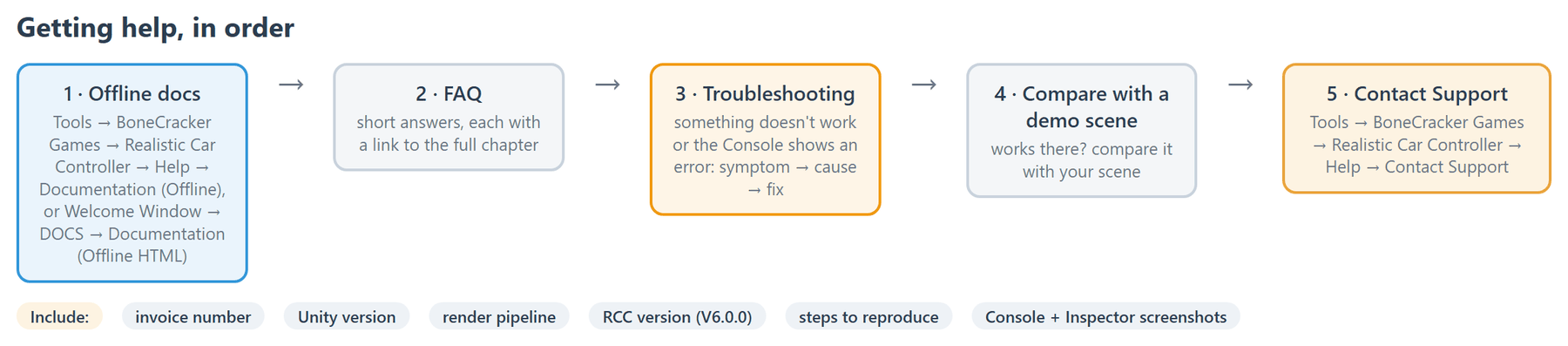
What should I include in a support request?
- Unity version and render pipeline (Built-in / URP / HDRP).
- RCC version (V6.0.0).
- Steps to reproduce the problem.
- Screenshots of the Console and the relevant Inspector.