Scripts Reference
Every C# script in RCC V6.0.0, grouped by folder, with its type and a one-line description. Use it to find which script owns a behavior.
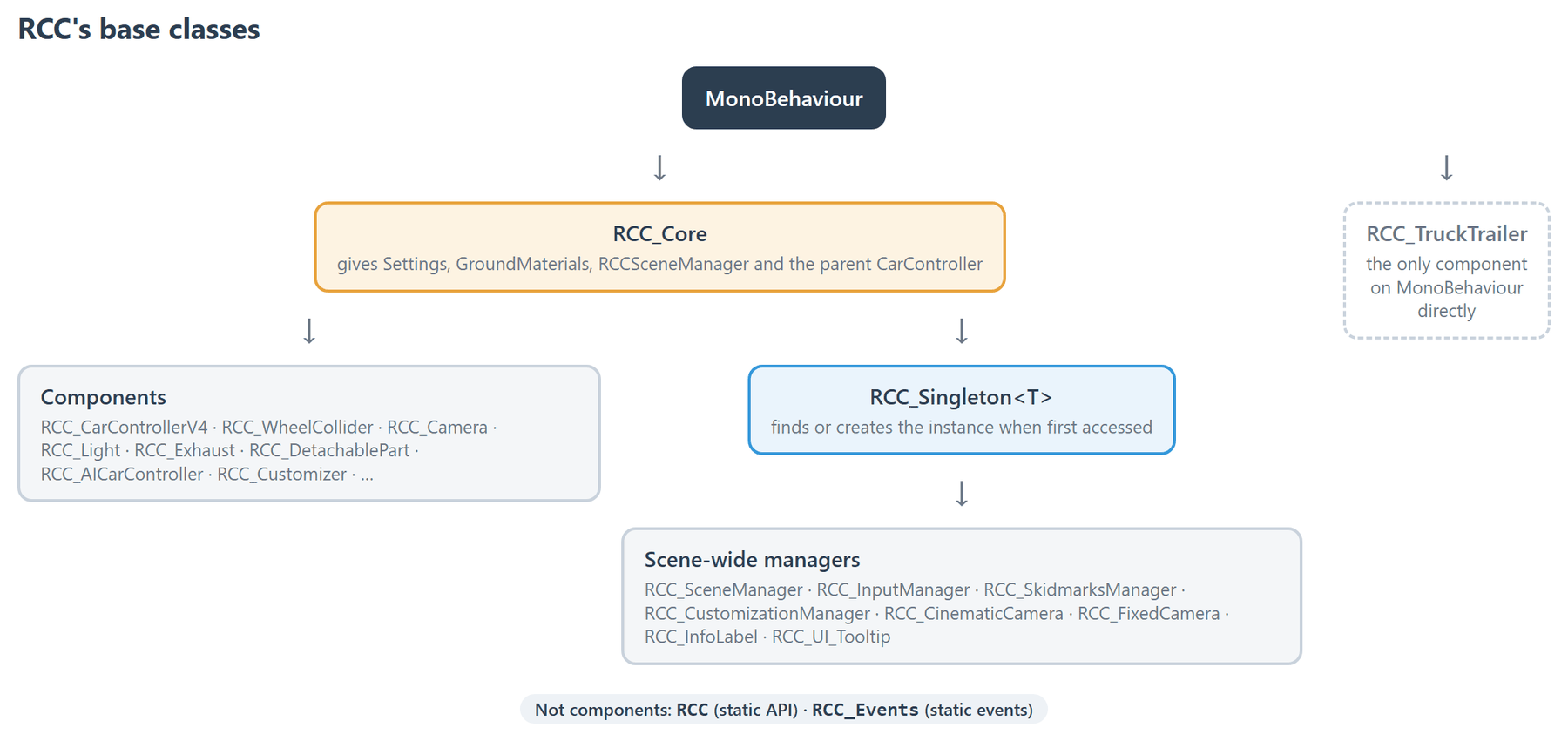
- Base class: every RCC component inherits
RCC_Core(onlyRCC_TruckTrailerusesMonoBehaviourdirectly). Scene-wide managers inheritRCC_Singleton<T>, which finds or creates the instance when first accessed. - Naming: every class starts with
RCC_, lives in the global namespace, and compiles intoAssembly-CSharp(no.asmdef). Custom inspectors are usually named<Component>Editor; the vehicle inspector isRCC_Editor.cs. - Start reading here:
Scripts/RCC.cs(the static API, see Scripting API) andScripts/RCC_CarControllerV4.cs(the vehicle).
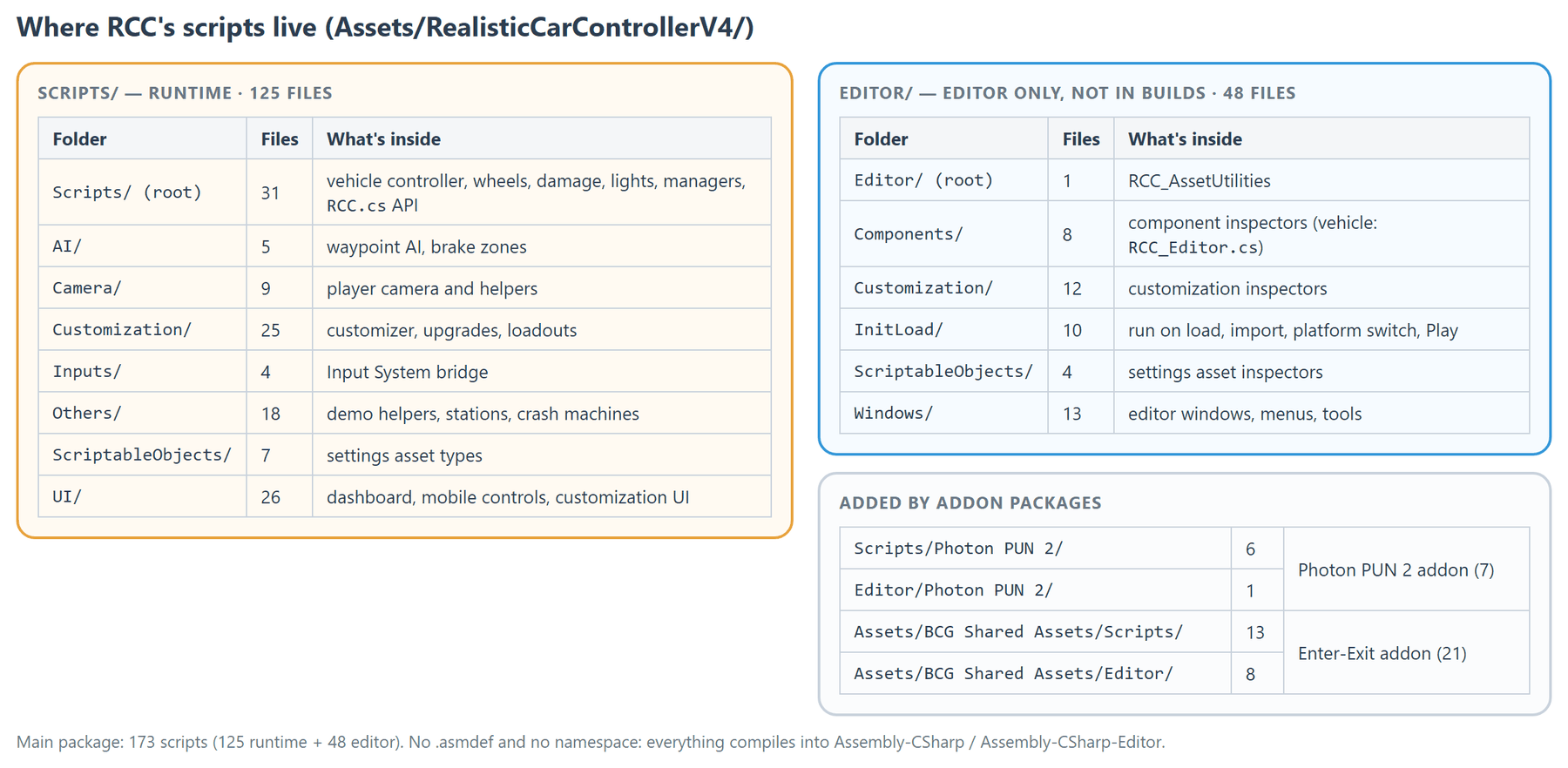
Paths are relative to Assets/RealisticCarControllerV4/ unless they start with Assets/. The main package has 173 scripts: 125 runtime + 48 editor. The addon packages add 7 Photon PUN 2 scripts and 21 Enter-Exit scripts.
Runtime scripts
Scripts/ (31 files)
Core runtime: vehicle controller, wheels, damage, lights, managers.
| Script | Type | What it does |
|---|---|---|
RCC.cs |
class (static members) | The static API for game code: spawn, register, control, repair and transport vehicles, change camera and behavior, record and replay. See Scripting API. |
RCC_Caliper.cs |
RCC_Core | Keeps a brake caliper on its wheel: follows the wheel's suspension travel, camber, caster and steer angle, but does not spin with the wheel. |
RCC_CarControllerV4.cs |
RCC_Core | The main vehicle controller: wheels and suspension, steering, engine and gearbox, brakes and stability assists, lights, audio and effects, damage and collisions. Holds the RCC_Damage settings. |
RCC_CheckUp.cs |
class (static members) | Static helpers that list a vehicle's colliders and rigidbodies; the vehicle inspector (RCC_Editor.cs) uses them for its setup warnings. |
RCC_ColorPickerBySliders.cs |
RCC_Core | UI color picker that uses three sliders (R, G, B) to let the player choose a color for wheel smoke particles or headlight tint on the active vehicle. |
RCC_Core.cs |
MonoBehaviour | Base class for all RCC components. Gives every component Settings, GroundMaterials, RCCSceneManager and its parent CarController without manual lookups. |
RCC_Damage.cs |
class ([Serializable]) | Damage settings and logic, stored as the damage field on RCC_CarControllerV4: mesh deformation, wheel damage and detachment, light breakage, detachable parts. |
RCC_DetachablePart.cs |
RCC_Core | Represents a detachable part of the vehicle, such as a hood, trunk, door, or bumper. |
RCC_Emission.cs |
class ([Serializable]) | Drives a material's emission from a light's color and intensity. Used by the emission list on RCC_Light. |
RCC_Events.cs |
class (static events) | Static event hub: player and AI vehicle spawned / destroyed, player collision, camera spawned, behavior and vehicle changed, input events (engine, lights, gears, camera, record / replay, trailer), Enter-Exit enter / exit. See Events System. |
RCC_Exhaust.cs |
RCC_Core | Manages exhaust effects using a Particle System. This includes smoke behavior tied to throttle input and optional flame emission (with light and flare effects) when the engine is running at certain conditions. |
RCC_GetBounds.cs |
class (static members) | Static helpers that measure a GameObject's combined renderer bounds, bounds center, largest extent and biggest mesh. |
RCC_Joint.cs |
class | Stores and restores ConfigurableJoint settings. Used by the damage and detachable part systems. |
RCC_LOD.cs |
RCC_Core | Distance-based optimization: deactivates a vehicle's audio sources, particle systems and hood / wheel cameras when it is far from the RCC camera. See Mobile Setup. |
RCC_Light.cs |
RCC_Core | Handles all types of vehicle lighting in RCC, including headlights, brake lights, indicators, reverse lights, interior lights, and more. |
RCC_Mirror.cs |
RCC_Core | Renders a mirror effect by inverting the attached Camera's projection matrix. |
RCC_Octree.cs |
class ([Serializable]) | An octree data structure specialized for storing and searching vertices of a mesh. |
RCC_OctreeNode.cs |
class ([Serializable]) | Represents a single node within an octree. Each node either holds a collection of vertices (leaf node) or has up to eight child nodes if it has been subdivided. |
RCC_PlayerPrefsX.cs |
class (static members) | Extended PlayerPrefs utility supporting additional types: bool, long, Vector2, Vector3, Quaternion, Color, and arrays of float, int, bool, string, Vector2, Vector3, Quaternion, and Color. |
RCC_PoliceSiren.cs |
RCC_Core | Alternating red and blue police siren lights. Automatically activates when attached to an AI vehicle that is in chase mode. |
RCC_Recorder.cs |
RCC_Core | Records and replays vehicle inputs, transforms, and rigidbody states. |
RCC_SceneManager.cs |
RCC_Singleton (MonoBehaviour) | Scene-wide manager. Tracks the active player vehicle and camera, all spawned vehicles and terrains, record / replay and the behavior preset. |
RCC_SetLayer.cs |
RCC_Core | Sets the layer of this GameObject (and optionally its children) on enable. |
RCC_Singleton.cs |
RCC_Core | Generic base class for scene-wide managers (RCC_Singleton<T>). Finds or creates the instance the first time it is accessed. |
RCC_Skidmarks.cs |
RCC_Core | Generates and manages a procedural mesh for skidmark rendering on a specific ground surface type. |
RCC_SkidmarksManager.cs |
RCC_Singleton (MonoBehaviour) | Singleton manager that creates and manages one RCC_Skidmarks instance per ground material type. |
RCC_SpeedLimiter.cs |
RCC_Core | Trigger-based speed limiter that slows vehicles by increasing their Rigidbody drag while inside the trigger zone. |
RCC_TrailerAttachPoint.cs |
RCC_Core | Trigger-based attachment point for trailers. When this trigger collider overlaps another RCC_TrailerAttachPoint on a vehicle, it sends an attach message to the parent trailer's ConfigurableJoint. |
RCC_TruckTrailer.cs |
MonoBehaviour | Manages a towable trailer with its own wheel colliders, lights, center of mass, and attach/detach logic. |
RCC_Version.cs |
class (static members) | Holds the package version string (RCC_Version.version, currently V6.0.0). |
RCC_WheelCollider.cs |
RCC_Core | Wraps Unity's WheelCollider with additional properties such as drift, deflation, dynamic friction adjustments, and skid particle/audio management. |
Scripts/AI/ (5 files)
Waypoint AI and brake zones.
| Script | Type | What it does |
|---|---|---|
RCC_AIBrakeZone.cs |
RCC_Core | A zone that sets the target speed for AI vehicles inside it; place one before a sharp turn. |
RCC_AIBrakeZonesContainer.cs |
RCC_Core | Manages a collection of brake zones and provides visualization in the Unity Editor. |
RCC_AICarController.cs |
RCC_Core | Drives an RCC vehicle on its own. Navigation modes: Follow Waypoints, Chase Target, Follow Target. Needs RCC_CarControllerV4 on the same GameObject. |
RCC_AIWaypointsContainer.cs |
RCC_Core | Container that holds and manages a list of RCC_Waypoint nodes defining the AI driving path. |
RCC_Waypoint.cs |
RCC_Core | Represents a single waypoint node in an AI driving path. |
Scripts/Camera/ (9 files)
Player camera and its helpers.
| Script | Type | What it does |
|---|---|---|
RCC_Camera.cs |
RCC_Core | The player camera. One camera moves between six modes: TPS, FPS (hood), Wheel, Fixed, Cinematic and Top, with orbit, collision and occlusion handling and dynamic FOV. |
RCC_CameraCarSelection.cs |
RCC_Core | Controls the showroom camera while selecting vehicles. |
RCC_CinematicCamera.cs |
RCC_Singleton (MonoBehaviour) | Tracks the player's vehicle and maintains a cinematic camera angle. |
RCC_FOVForCinematicCamera.cs |
RCC_Core | Attaches to the "Animation Pivot" of the Cinematic Camera and continuously applies a Field of View (FOV) value to the RCC_CinematicCamera. |
RCC_FixedCamera.cs |
RCC_Singleton (MonoBehaviour) | Fixed-position camera mode: stays in place and turns and zooms (FOV) to follow the player vehicle. |
RCC_HoodCamera.cs |
RCC_Core | Marks the hood camera position on a vehicle. The RCC camera is parented here in Hood Camera mode. |
RCC_MainCameraProvider.cs |
static class | Provides cached access to the main camera to avoid the performance overhead of Camera.main. |
RCC_ShowroomCamera.cs |
RCC_Core | Showroom camera that orbits around a target transform, typically used in main menu or vehicle preview scenes. |
RCC_WheelCamera.cs |
RCC_Core | Marker component that designates a transform as the wheel camera mount point. |
Scripts/Customization/ (25 files)
Customizer system: per-vehicle managers, upgrades, loadouts.
| Script | Type | What it does |
|---|---|---|
RCC_CustomizationData.cs |
class ([Serializable]) | Serializable data class that stores all vehicle customization settings including suspension, camber, driving assists, and visual options. |
RCC_CustomizationDemo.cs |
RCC_Core | Customization demo scene helper. Switches cameras and canvases when entering and leaving customization mode. |
RCC_CustomizationManager.cs |
RCC_Singleton (MonoBehaviour) | Scene-wide customization manager singleton. Required in the scene for the customization system to function. |
RCC_CustomizationSetups.cs |
ScriptableObject | ScriptableObject singleton that holds prefab references for all customization sub-manager setups. |
RCC_CustomizationTrigger.cs |
RCC_Core | Trigger in the customization demo. Enters customization mode when the player vehicle drives in. |
RCC_Customization_API.cs |
RCC_Core (static methods) | Static customization methods for game code: suspension, camber, wheels, headlight and smoke color, driving assists, save / load to PlayerPrefs. |
RCC_Customizer.cs |
RCC_Core | Root customization component on a vehicle. Coordinates its sub-managers (paint, wheels, upgrades, spoilers, sirens, decals, neons, customization) and saves / loads the loadout to PlayerPrefs as JSON. |
RCC_Customizer_Brake.cs |
RCC_Core | Upgradable brake component. Increases brake torque of the parent vehicle's car controller based on the current upgrade level and efficiency multiplier. |
RCC_Customizer_CustomizationManager.cs |
RCC_Core | Per-vehicle customization manager that handles suspension, camber, headlight color, smoke color, and other tuning settings. |
RCC_Customizer_Decal.cs |
RCC_Core | One decal slot on a vehicle, drawn with a URP Decal Projector. Decals work in URP only; on Built-in and HDRP setting a decal does nothing. |
RCC_Customizer_DecalManager.cs |
RCC_Core | Manager for upgradable decals on all four sides of the vehicle (front, back, left, right). |
RCC_Customizer_Engine.cs |
RCC_Core | Upgradable engine component. Increases engine torque of the parent vehicle's car controller based on the current upgrade level and efficiency multiplier. |
RCC_Customizer_Handling.cs |
RCC_Core | Upgradable handling component. Increases traction helper strength of the parent vehicle's car controller based on the current upgrade level and efficiency multiplier. |
RCC_Customizer_Loadout.cs |
class ([Serializable]) | Serializable loadout class that stores the complete customization state of a vehicle. |
RCC_Customizer_Neon.cs |
RCC_Core | One underglow neon slot on a vehicle, drawn with a URP Decal Projector. Neons work in URP only; on Built-in and HDRP setting a neon does nothing. |
RCC_Customizer_NeonManager.cs |
RCC_Core | Manager for upgradable neon effects on the vehicle. |
RCC_Customizer_Paint.cs |
RCC_Core | Individual paint component that can change the color of a specific material on the vehicle. |
RCC_Customizer_PaintManager.cs |
RCC_Core | Manager for all paint components on a vehicle. Coordinates applying a single color to all body painters, and handles save/load via the customizer loadout. |
RCC_Customizer_Siren.cs |
RCC_Core | Represents an individual siren attachment on the vehicle. |
RCC_Customizer_SirenManager.cs |
RCC_Core | Manager for all upgradable sirens on the vehicle. Only one siren can be active at a time. |
RCC_Customizer_Speed.cs |
RCC_Core | Upgradable speed component. Adjusts the vehicle's final drive ratio (differential) to increase top speed based on the current upgrade level and efficiency multiplier. |
RCC_Customizer_Spoiler.cs |
RCC_Core | Represents an individual spoiler attachment on the vehicle. |
RCC_Customizer_SpoilerManager.cs |
RCC_Core | Manager for all upgradable spoilers on the vehicle. |
RCC_Customizer_UpgradeManager.cs |
RCC_Core | Manager for all performance upgrade components (Engine, Brake, Handling, Speed). |
RCC_Customizer_WheelManager.cs |
RCC_Core | Manager for upgradable wheels on the vehicle. Handles wheel model swapping, radius recalculation, and save/load via the customizer loadout. |
Scripts/Inputs/ (4 files)
Input System bridge.
| Script | Type | What it does |
|---|---|---|
RCC_InputActions.cs |
class (generated) | Generated by the Input System from Resources/RCC_InputActions.inputactions. Do not edit it; edit the .inputactions asset instead. |
RCC_InputManager.cs |
RCC_Singleton (MonoBehaviour) | Reads the Input System (and mobile controls) and fills an RCC_Inputs instance for the player vehicle. Also raises the input events on RCC_Events. |
RCC_Inputs.cs |
class ([Serializable]) | Represents all essential input values for controlling a vehicle and its camera in RCC. |
RCC_MobileButtons.cs |
RCC_Core | Mobile controls hub on the RCC Canvas. Collects the on-screen buttons, joystick, steering wheel or tilt input into the static RCC_MobileButtons.mobileInputs, which RCC_InputManager reads when mobile controls are enabled. |
Scripts/Others/ (18 files)
Demo scene helpers, stations, crash machines, utilities.
| Script | Type | What it does |
|---|---|---|
RCC_AIO.cs |
RCC_Core | Manages the All-In-One (AIO) playable demo scene for RCC. |
RCC_APIExample.cs |
RCC_Core | Demonstrates how to use the RCC API for spawning, registering, and controlling vehicles. |
RCC_CarSelectionExample.cs |
RCC_Core | Manages the vehicle selection system in the RCC demo scene. |
RCC_CharacterController.cs |
RCC_Core | Animates the driver character inside a vehicle: sets Animator parameters from the vehicle's steering, gear shifting, collisions and reversing. |
RCC_CrashHammer.cs |
RCC_Core | Operates a swinging hammer obstacle in the damage demo scene. |
RCC_CrashPress.cs |
RCC_Core | Operates a vertical press obstacle in the damage demo scene. |
RCC_CrashShredder.cs |
RCC_Core | Operates a spinning shredder obstacle in the damage demo scene. |
RCC_Demo.cs |
RCC_Core | A simple manager script for RCC demo scenes. It can spawn new player vehicles, set behavior modes, restart scenes, and quit the application. |
RCC_FuelStation.cs |
RCC_Core | Represents a fuel station area. When a vehicle with RCC_CarControllerV4 enters this trigger, it gradually refills the vehicle's fuel tank at the specified rate. |
RCC_LevelLoader.cs |
RCC_Core | Simple utility component for loading scenes by name. |
RCC_OverrideInputsExample.cs |
RCC_Core | Demonstrates how to override vehicle inputs in Realistic Car Controller. |
RCC_Prop.cs |
RCC_Core | Represents a destructible environment prop (e.g., traffic cones, barriers, crates). |
RCC_RepairStation.cs |
RCC_Core | Represents a station that repairs any RCC vehicle entering its trigger zone. |
RCC_ShadowRotConst.cs |
RCC_Core | Locks the rotation of a shadow projector to face straight down while following the vehicle's Y-axis rotation. |
RCC_Spawner.cs |
RCC_Core | Spawns the last saved vehicle selection from PlayerPrefs at this transform's position and rotation on Start. |
RCC_SuspensionArm.cs |
RCC_Core | Visually animates a suspension arm (e.g., wishbone, trailing arm) by translating or rotating it based on the linked WheelCollider's current suspension compression distance. |
RCC_Teleporter.cs |
RCC_Core | Trigger-based teleporter that transports any RCC vehicle entering its zone to a designated spawn point. |
RCC_Useless.cs |
RCC_Core | Demo UI helper: sets a Dropdown to the current RCC setting on Awake (main controller, mobile controller type, behavior preset or graphics quality). |
Scripts/ScriptableObjects/ (7 files)
Settings asset types. The assets themselves are in Resources/RCC Assets/.
| Script | Type | What it does |
|---|---|---|
RCC_AssetPaths.cs |
ScriptableObject | ScriptableObject that stores asset references, project paths, and external links used by the RCC editor tools and setup wizards. |
RCC_ChangableWheels.cs |
ScriptableObject | List of wheel prefabs that can be swapped onto vehicles (customization wheel menu). |
RCC_DemoVehicles.cs |
ScriptableObject | Holds a collection of demo vehicle prefabs (RCC_CarControllerV4) for easy retrieval and spawning in demo scenes. |
RCC_GroundMaterials.cs |
ScriptableObject | Contains references for various ground materials and their associated physics and effects. |
RCC_InitialSettings.cs |
ScriptableObject | A ScriptableObject that stores the default wheel friction and suspension settings for RCC vehicles, along with various Rigidbody parameters. |
RCC_Records.cs |
ScriptableObject | ScriptableObject that stores a collection of recorded vehicle replay clips. |
RCC_Settings.cs |
ScriptableObject | Central ScriptableObject that stores all shared RCC configuration including behavior presets, physics overrides, UI settings, audio clips, mobile controls, layer assignments, and prefab references. |
Scripts/UI/ (26 files)
Dashboard, mobile controls, customization UI.
| Script | Type | What it does |
|---|---|---|
RCC_DashboardColors.cs |
RCC_Core | Changes HUD image colors dynamically using RGB UI Sliders. |
RCC_DashboardInputs.cs |
RCC_Core | Receives data from the active vehicle in the scene and updates dashboard gauges (needles, texts, images). |
RCC_DashboardObjects.cs |
RCC_Core | Receives inputs from the active vehicle in your scene and updates visual (3D) dashboard needles (not UI images). |
RCC_InfoLabel.cs |
RCC_Singleton (MonoBehaviour) | Singleton UI component that displays temporary informational text messages on screen. |
RCC_Telemetry.cs |
RCC_Core | Displays real-time vehicle telemetry data on a UI panel for debugging and diagnostics. |
RCC_UI_Canvas_Customizer.cs |
RCC_Core | Manages the vehicle customization UI canvas, handling panel visibility and button interactability based on which customization sub-managers are available on the active player vehicle. |
RCC_UI_Color.cs |
RCC_Core | UI button that applies a preset paint color to the active player vehicle when clicked. |
RCC_UI_Controller.cs |
RCC_Core | On-screen button or slider that outputs a 0 to 1 input while pressed. The mobile gas, brake and other buttons use it. |
RCC_UI_ControlsPanel.cs |
RCC_Core | Simple panel toggle controller for the keyboard controls reference overlay. |
RCC_UI_CustomizationSlider.cs |
RCC_Core | UI slider for vehicle suspension and camber customization. |
RCC_UI_DashboardButton.cs |
RCC_Core | Multi-purpose UI button used in the dashboard options panel. |
RCC_UI_DashboardDisplay.cs |
RCC_Core | Manages the main RCC dashboard canvas, updating text labels, indicator images, and panel visibility based on the active player vehicle's state. |
RCC_UI_Decal.cs |
RCC_Core | UI button that applies a decal material to the active player vehicle at a specified location. |
RCC_UI_DecalSetLocation.cs |
RCC_Core | UI button that sets the decal placement location on all RCC_UI_Decal buttons in the scene. |
RCC_UI_Drag.cs |
RCC_Core | Mobile UI drag handler that forwards touch/mouse drag events to the active RCC player camera for orbiting control. |
RCC_UI_Joystick.cs |
RCC_Core | Mobile UI joystick controller that captures drag events and converts them to normalized horizontal and vertical input values (range -1 to 1). |
RCC_UI_LevelButton.cs |
RCC_Core | Per-button hover handler for AIO demo scene selector buttons. |
RCC_UI_Neon.cs |
RCC_Core | UI button that applies a neon light material to the active player vehicle's neon manager when clicked. |
RCC_UI_ShowroomCameraDrag.cs |
RCC_Core | Mobile UI drag handler that forwards touch/mouse drag events to the showroom camera for orbit control. |
RCC_UI_Siren.cs |
RCC_Core | UI button that equips a siren on the active player vehicle when clicked. |
RCC_UI_SliderTextReader.cs |
RCC_Core | Reads the current value from a UI Slider each frame and displays it as formatted text (one decimal place). |
RCC_UI_Spoiler.cs |
RCC_Core | UI button that equips a spoiler on the active player vehicle when clicked. |
RCC_UI_SteeringWheelController.cs |
RCC_Core | Mobile UI steering wheel controller. Tracks touch/mouse input on a circular Image to produce a normalized steering input value (-1 to 1). |
RCC_UI_Tooltip.cs |
RCC_Singleton (MonoBehaviour) | Singleton UI component that displays tooltip descriptions when hovering over level buttons. |
RCC_UI_Upgrade.cs |
RCC_Core | UI button for upgrading a specific performance category (Engine, Handling, Brake, or Speed) on the active player vehicle. |
RCC_UI_Wheel.cs |
RCC_Core | UI button that changes the wheels on the active player vehicle when clicked. |
Editor scripts
Editor-only; they are not included in builds.
Editor/ (root) (1 file)
| Script | Type | What it does |
|---|---|---|
RCC_AssetUtilities.cs |
static class | Utility for locating the root folder of the Realistic Car Controller asset, even if the user renames or moves the package folder. |
Editor/Components/ (8 files)
Custom inspectors for components.
| Script | Type | What it does |
|---|---|---|
RCC_AIBZEditor.cs |
Editor | Custom inspector for RCC_AIBrakeZonesContainer. Shift + click in the Scene view adds a brake zone at the clicked point. |
RCC_AICarControllerEditor.cs |
Editor | Custom inspector for RCC_AICarController. |
RCC_AIWPEditor.cs |
Editor | Custom inspector for RCC_AIWaypointsContainer. Shift + click in the Scene view adds a waypoint at the clicked point. |
RCC_CameraEditor.cs |
Editor | Custom inspector for RCC_Camera. |
RCC_Editor.cs |
Editor | The RCC_CarControllerV4 inspector: tabbed sections (wheels, steering, suspension, configuration, customizer, inputs, stability, lights, audio, damage) plus setup checks. Also defines Tools → BoneCracker Games → Realistic Car Controller → Add Main Controller To Vehicle, which offers the setup wizard or adds the controller only. |
RCC_LightEditor.cs |
Editor | Custom inspector for RCC_Light. |
RCC_SceneManagerEditor.cs |
Editor | Custom inspector for RCC_SceneManager. |
RCC_WheelColliderEditor.cs |
Editor | Custom inspector for RCC_WheelCollider. |
Editor/Customization/ (12 files)
Custom inspectors for the customization system.
| Script | Type | What it does |
|---|---|---|
RCC_CustomizerEditor.cs |
Editor | Custom inspector for RCC_Customizer. |
RCC_Customizer_DecalEditor.cs |
Editor | Custom inspector for RCC_Customizer_DecalManager. |
RCC_Customizer_NeonEditor.cs |
Editor | Custom inspector for RCC_Customizer_NeonManager. |
RCC_Customizer_PaintEditor.cs |
Editor | Custom inspector for RCC_Customizer_PaintManager. |
RCC_Customizer_SirenEditor.cs |
Editor | Custom inspector for RCC_Customizer_SirenManager. |
RCC_Customizer_SpoilerEditor.cs |
Editor | Custom inspector for RCC_Customizer_SpoilerManager. |
RCC_Customizer_UpgradeEditor.cs |
Editor | Custom inspector for RCC_Customizer_UpgradeManager. |
RCC_Customizer_Upgrade_BrakeEditor.cs |
Editor | Custom inspector for RCC_Customizer_Brake. |
RCC_Customizer_Upgrade_EngineEditor.cs |
Editor | Custom inspector for RCC_Customizer_Engine. |
RCC_Customizer_Upgrade_HandlingEditor.cs |
Editor | Custom inspector for RCC_Customizer_Handling. |
RCC_Customizer_Upgrade_SpeedEditor.cs |
Editor | Custom inspector for RCC_Customizer_Speed. |
RCC_Customizer_WheelEditor.cs |
Editor | Custom inspector for RCC_Customizer_WheelManager. |
Editor/InitLoad/ (10 files)
Run automatically on editor load, import, platform switch or Play.
| Script | Type | What it does |
|---|---|---|
RCC_AddonDefineCleaner.cs |
AssetModificationProcessor | Removes RCC defines when their code is deleted inside Unity, so the project keeps compiling: BCG_ENTEREXIT (Enter-Exit addon), RCC_PHOTON (Photon addon scripts), all RCC defines (RCC folder), BCG_URP / BCG_HDRP (URP / HDRP package). Menu: Tools → BoneCracker Games → Realistic Car Controller → Other → Remove Stale Add-on Defines. |
RCC_CheckBeforePlay.cs |
static class ([InitializeOnLoad]) | When you enter Play Mode, warns if RCC Settings → Mobile Controller Enabled does not match the active build platform. The warning can be turned off per project. Menu: Tools → BoneCracker Games → Realistic Car Controller → Other → Reset Mobile Controller Warnings. |
RCC_InitLoad.cs |
EditorWindow ([InitializeOnLoadMethod]) | Runs on every editor load: checks RCC layers (RCC_Installation) and sets BCG_URP / BCG_HDRP to match the active render pipeline, again whenever the pipeline changes. On first import it also adds the BCG_RCC define and shows the setup dialog and Welcome Window. |
RCC_InitLoadHappyMessage.cs |
class ([InitializeOnLoadMethod]) | Prints a thank-you message to the Console once per editor session. |
RCC_InputSystemVersionChecker.cs |
static class ([InitializeOnLoad]) | Warns when the installed Input System package version is known to cause problems with RCC. Menu: Tools → BoneCracker Games → Realistic Car Controller → Other → Input System Version Checker. |
RCC_Installation.cs |
class (static members) | Checks for missing RCC layers (names set in RCC Settings) and offers to add them, sets the physics collision matrix between RCC layers, and reassigns layers on RCC vehicle, detachable part, trailer and prop prefabs. Called by RCC_InitLoad. |
RCC_MobilePlatformSync.cs |
class (IActiveBuildTargetChanged, IPreprocessBuildWithReport) | Switching the build target to Android / iOS turns RCC Settings → Mobile Controller Enabled on; switching to a desktop target turns it off (WebGL and others are left alone). Builds only log a warning on a mismatch. |
RCC_ScriptExecutionOrderManager.cs |
class ([InitializeOnLoad]) | Applies RCC's script execution order on import (Project Settings are not part of the package). Do not set RCC's execution order by hand. |
RCC_SetScriptingSymbol.cs |
static class | Helper that adds or removes a scripting define symbol on all build target groups. |
RCC_UpgradeWindow.cs |
EditorWindow | Information window about upgrading to Realistic Car Controller Pro. Menu: Tools → BoneCracker Games → Realistic Car Controller → Upgrade to Realistic Car Controller Pro. |
Editor/ScriptableObjects/ (4 files)
Inspectors for the settings assets.
| Script | Type | What it does |
|---|---|---|
RCC_FixAxisWindow.cs |
EditorWindow | Rotates a mesh's vertices to fix its axis orientation and saves the result as a new mesh asset. Opened by the Fix Axis button in the vehicle inspector's damage mesh list. |
RCC_GroundMaterialsEditor.cs |
Editor | Custom inspector for the RCC_GroundMaterials asset. Menu: Tools → BoneCracker Games → Realistic Car Controller → Configure → Configure Ground Materials. |
RCC_RecordsEditor.cs |
Editor | Custom inspector for the RCC_Records asset. Menu: Tools → BoneCracker Games → Realistic Car Controller → Configure → Configure Recorded Clips. |
RCC_SettingsEditor.cs |
Editor | Custom inspector for the RCC_Settings asset. Menu: Tools → BoneCracker Games → Realistic Car Controller → Edit RCC Settings. |
Editor/Windows/ (13 files)
Editor windows, menus and tools.
| Script | Type | What it does |
|---|---|---|
RCC_AIO_SetupWindow.cs |
EditorWindow | Builds the AIO demo scene selector (category headers, tooltips, level button descriptions, controls panel). Menu: Tools → BoneCracker Games → Realistic Car Controller → Setup AIO Demo Selector. |
RCC_AssetRenamer.cs |
static class | Renames RCC assets whose names had typos or inconsistent naming. Menu: Tools → BoneCracker Games → Realistic Car Controller → Other → Fix Asset Names. |
RCC_CheckAxisOrientation.cs |
class (static members) | Checks that a vehicle model faces RCC's axis convention (length along Z, height along Y). Used by the setup wizard. |
RCC_CreateNewVehicle.cs |
class (static members) | Turns a plain vehicle model into an RCC vehicle: adds the controller and Rigidbody and applies RCC_InitialSettings. Used by the setup wizard and Add Main Controller To Vehicle. |
RCC_DetectPossibleWheels.cs |
class (static members) | Finds likely wheel meshes on a vehicle model from mesh bounds. Used by the setup wizard. |
RCC_EditorWindows.cs |
Editor (menu host) | Defines most Tools → BoneCracker Games → Realistic Car Controller menu items and their GameObject menu mirrors: Edit RCC Settings, Configure, Create (managers, cameras, lights, UI, misc), AI, Render Pipeline Converter, Other, Upgrade, Help. |
RCC_PackageImportUtility.cs |
static class | Imports RCC's bundled .unitypackage payloads (shaders, resources, Photon, Enter-Exit) on every supported Unity version. On Unity 6.6 it first explains Unity's "Missing Signature" window, once per editor session. |
RCC_PopupWindow_PossibleWheels.cs |
EditorWindow | Popup in the setup wizard for confirming the detected wheels. |
RCC_QuickVehicleSetupWizardWindow.cs |
EditorWindow | Step-by-step wizard that turns the selected model into an RCC vehicle: adds the controller, checks axis orientation, assigns front and rear wheels, creates the body collider. Menu: Tools → BoneCracker Games → Realistic Car Controller → Quick Vehicle Setup Wizard. |
RCC_RenderPipelineConverterWindow.cs |
EditorWindow | Converts RCC materials, shaders, lens flares and camera post-processing between Built-in, URP and HDRP. See Render Pipelines. Menu: Tools → BoneCracker Games → Realistic Car Controller → Render Pipeline Converter. |
RCC_SceneGUI.cs |
static class ([InitializeOnLoad]) | Optional toolbar in the Scene view with buttons for adding the RCC camera, canvas, vehicle cameras and lights. Turned on and off from the menu (no shortcut). Menu: Tools → BoneCracker Games → Realistic Car Controller → Enable In-Scene Buttons; Tools → BoneCracker Games → Realistic Car Controller → Disable In-Scene Buttons. |
RCC_ScriptHeaderCheckerWindow.cs |
EditorWindow | Scans, previews, fixes and cleans the copyright header on C# scripts in the RCC folder. Menu: Tools → BoneCracker Games → Realistic Car Controller → Other → Script Header Checker. |
RCC_WelcomeWindow.cs |
EditorWindow | Welcome window shown after import. Tabs for welcome info, demo scenes, update guidance, addon installers and documentation. Menu: Tools → BoneCracker Games → Realistic Car Controller → Help → Documentation (Offline); Tools → BoneCracker Games → Realistic Car Controller → Welcome Window. |
Addon scripts (installed by the addon packages)
These arrive with the payloads in Addon Packages/, imported from Welcome Window → Addons. See Addon Packages.
Scripts/Photon PUN 2/ (6 files)
Photon PUN 2 addon, runtime. Needs PUN 2 in the project; the networking scripts compile only when RCC_PHOTON is defined.
| Script | Type | What it does |
|---|---|---|
RCC_PhotonChecker.cs |
RCC_Core | Loads the Photon lobby scene when the game is started without an active Photon connection (e.g. playing a gameplay scene directly in the editor). |
RCC_PhotonDemoVehicles.cs |
ScriptableObject | List of networked vehicle prefabs for the Photon demo (Resources/Photon Vehicles/). |
RCC_PhotonManager.cs |
MonoBehaviourPunCallbacks | Photon demo lobby: connects to Photon, creates and joins rooms, updates the lobby UI. |
RCC_PhotonSync.cs |
MonoBehaviourPunCallbacks | Synchronizes an RCC vehicle over Photon PUN 2. The owner sends inputs, vehicle state, lights and the rigidbody pose; remote copies are driven as external controllers with interpolation, extrapolation and lag compensation. |
RCC_PhotonUIChatLine.cs |
RCC_Core | A single chat message line in the Photon lobby / room chat panel. |
RCC_PhotonUIRoom.cs |
RCC_Core | A room entry in the Photon lobby room list. Clicking it joins the room. |
Editor/Photon PUN 2/ (1 file)
Photon PUN 2 addon, editor.
| Script | Type | What it does |
|---|---|---|
RCC_PhotonInitLoad.cs |
static class | Runs once on first import of the Photon addon: adds RCC_PHOTON (only if PUN 2 is present), shows the welcome dialog, offers render pipeline conversion on URP / HDRP. |
Assets/BCG Shared Assets/Scripts/ (13 files)
Enter-Exit addon, runtime.
| Script | Type | What it does |
|---|---|---|
RCC_EnterExitCharacterUICanvas.cs |
MonoBehaviour | Switches UI elements between the on-foot and in-vehicle states. |
RCC_EnterExitInputActions.cs |
class (IDisposable) | Input System actions for the on-foot character: Movement, Aim, AimStick, Interact. |
RCC_EnterExitInputManager.cs |
RCC_Singleton (MonoBehaviour) | Reads the on-foot character inputs (keyboard / mouse, gamepad or mobile joysticks). |
RCC_EnterExitJoystick.cs |
MonoBehaviour | On-screen joystick for mobile character movement/look in the RCC Enter/Exit system. |
RCC_EnterExitManager.cs |
RCC_Singleton (MonoBehaviour) | Scene-wide Enter-Exit manager. Tracks players and vehicles and handles entering and exiting. |
RCC_EnterExitPlayer.cs |
MonoBehaviour | Put on the player character (FPS or TPS). Detects vehicles with a raycast, enters and exits them, and fires the enter / exit events on RCC_Events. |
RCC_EnterExitSettings.cs |
ScriptableObject | ScriptableObject singleton that stores global settings for the RCC Enter/Exit system. |
RCC_EnterExitUI.cs |
MonoBehaviour | Canvas-based UI that shows/hides an interaction prompt when the player is near a vehicle. |
RCC_EnterExitVehicle.cs |
RCC_Core | Put on an RCC vehicle to make it enterable. Holds the get-out position, camera reference and current driver. |
RCC_FPSCharacterController.cs |
MonoBehaviour | First-person character controller for the RCC Enter/Exit system. |
RCC_MobileCharacterController.cs |
MonoBehaviour | Mobile input bridge: the on-screen joysticks write move / look values to its static fields, and RCC_EnterExitInputManager reads them in mobile mode. |
RCC_TPSCameraController.cs |
MonoBehaviour | Third-person orbit camera controller for the RCC Enter/Exit system. |
RCC_TPSCharacterController.cs |
MonoBehaviour | Third-person character controller for the RCC Enter/Exit system. |
Assets/BCG Shared Assets/Editor/ (8 files)
Enter-Exit addon, editor.
| Script | Type | What it does |
|---|---|---|
RCC_EnterExitInitLoad.cs |
static class | Runs once on first import of the Enter-Exit addon: adds BCG_ENTEREXIT, shows the welcome dialog, offers render pipeline conversion on URP / HDRP. |
RCC_EnterExitManagerEditor.cs |
Editor | Custom inspector for RCC_EnterExitManager. Also defines the Tools → BoneCracker Games → Realistic Car Controller → Enter-Exit menu: Edit Settings, Add Manager To Scene, Add To Vehicle, Add To FPS Player, Add To TPS Player, Add Enter-Exit UI To RCC Canvas, Add Mobile Controls To RCC Canvas. |
RCC_EnterExitPlayerEditor.cs |
Editor | Custom inspector for RCC_EnterExitPlayer. Displays configuration, detection, start-in-vehicle options, and runtime state. |
RCC_EnterExitSettingsEditor.cs |
Editor | Custom inspector for the RCC_EnterExitSettings asset. |
RCC_EnterExitVehicleEditor.cs |
Editor | Custom inspector for RCC_EnterExitVehicle. Shows driver (read-only at runtime), camera reference, and get-out position. |
RCC_FPSCharacterControllerEditor.cs |
Editor | Custom inspector for RCC_FPSCharacterController. Displays references, movement and look settings with validation warnings. |
RCC_TPSCameraControllerEditor.cs |
Editor | Custom inspector for RCC_TPSCameraController. Displays target reference, camera orbit settings, angle limits, and smoothing. |
RCC_TPSCharacterControllerEditor.cs |
Editor | Custom inspector for RCC_TPSCharacterController. Displays references, movement and rotation settings with validation warnings. |