Scripting API
This page covers the RCC class — RCC's beginner-facing API for spawning, registering and controlling vehicles from your own scripts — plus the most useful members of RCC_CarControllerV4 and RCC_SceneManager.
RCC lives in Scripts/RCC.cs. All of its methods are static: call them on the type, e.g. RCC.SpawnRCC(...). Every call must come from Unity's main thread.
Quick Start
- Add a camera: Tools → BoneCracker Games → Realistic Car Controller → Create → Cameras → Add RCC Camera To Scene.
- Create an empty GameObject and add the script below.
- Drag a vehicle prefab from
Prefabs/Vehicles/into Vehicle Prefab, and any Transform into Spawn Point. - Press Play. The car spawns with its engine running, waits 3 seconds, then takes your input.
using System.Collections;
using UnityEngine;

public class RaceStart : MonoBehaviour {

    public RCC_CarControllerV4 vehiclePrefab;
    public Transform spawnPoint;

    private IEnumerator Start() {

        // Spawn, register as the player vehicle, not controllable yet, engine running.
        RCC_CarControllerV4 car = RCC.SpawnRCC(vehiclePrefab, spawnPoint.position, spawnPoint.rotation, true, false, true);

        yield return new WaitForSeconds(3f);

        RCC.SetControl(car, true);

    }

}
You don't need to add an RCC Scene Manager first: RCC_SceneManager.Instance creates one if the scene has none.
The RCC Class
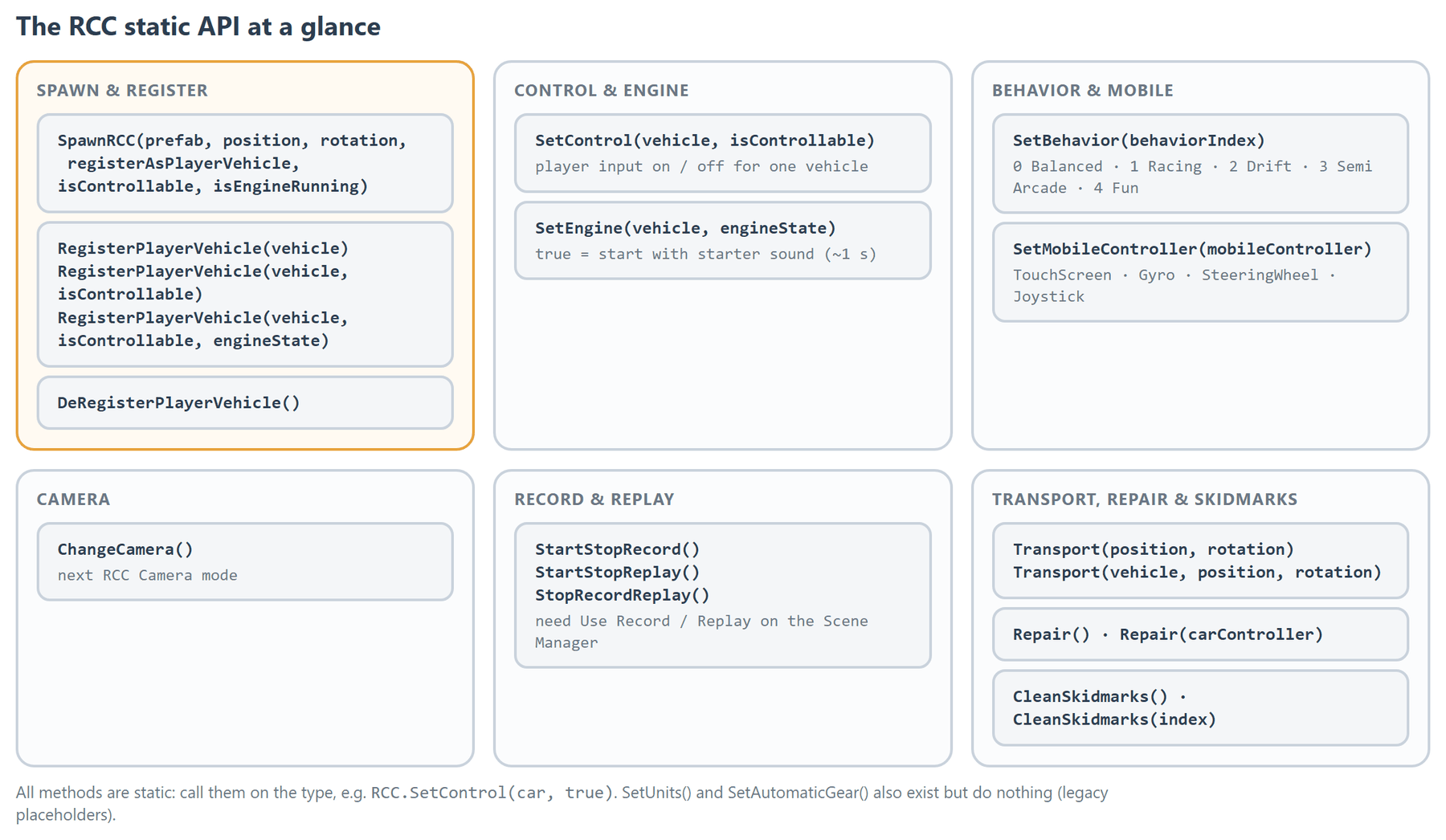
| Method | What it does | Notes |
|---|---|---|
SpawnRCC(RCC_CarControllerV4 vehiclePrefab, Vector3 position, Quaternion rotation, bool registerAsPlayerVehicle, bool isControllable, bool isEngineRunning) |
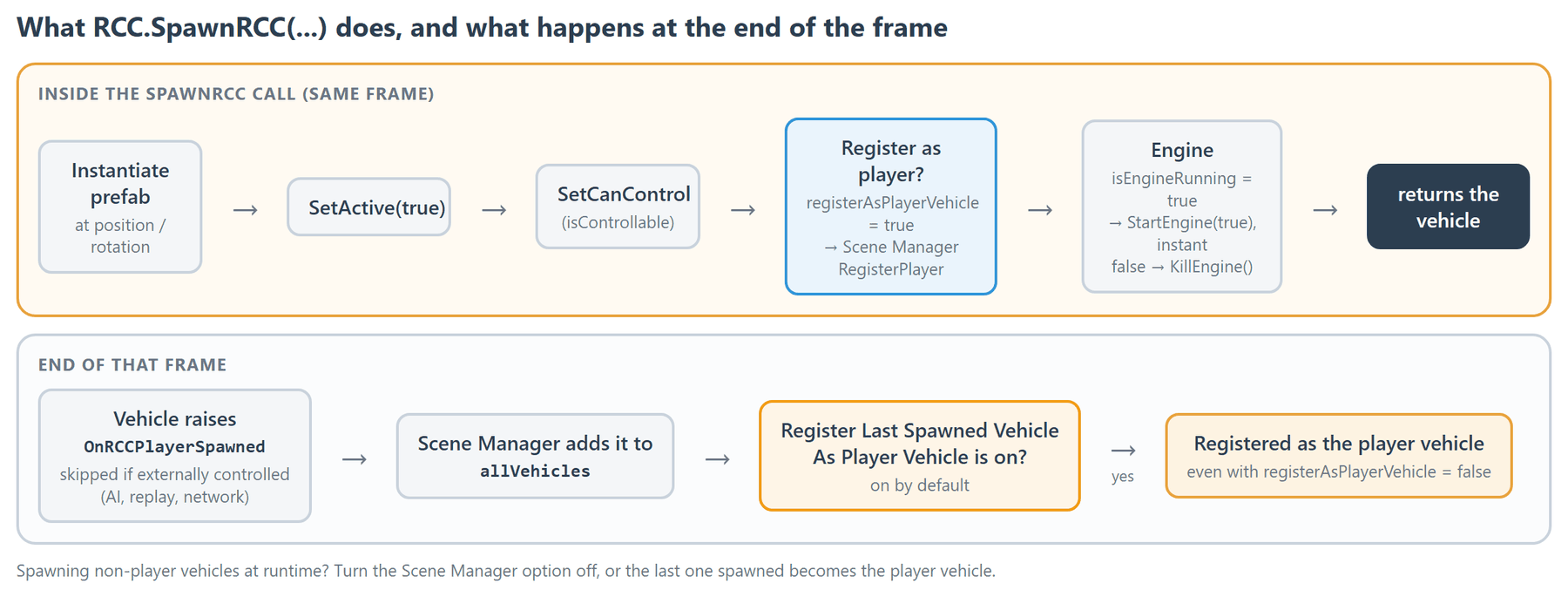
Instantiates the prefab, activates it, sets control, optionally registers it as the player vehicle, and starts or kills the engine. Returns the new vehicle. | isEngineRunning = true starts the engine instantly (no starter sound). |
RegisterPlayerVehicle(RCC_CarControllerV4 vehicle) |
Makes vehicle the player vehicle and points the RCC Camera at it. |
Does not change the vehicle's control state. |
RegisterPlayerVehicle(RCC_CarControllerV4 vehicle, bool isControllable) |
Same, and sets whether it takes input. | |
RegisterPlayerVehicle(RCC_CarControllerV4 vehicle, bool isControllable, bool engineState) |
Same, and starts or kills the engine. | true starts it with the starter sound (about 1 s). |
DeRegisterPlayerVehicle() |
Clears the player vehicle: it stops taking input and the camera loses its target. | |
SetControl(RCC_CarControllerV4 vehicle, bool isControllable) |
Turns player input on or off for one vehicle. | Same as vehicle.SetCanControl(...). |
SetEngine(RCC_CarControllerV4 vehicle, bool engineState) |
Starts (true, with starter sound, about 1 s) or kills (false) the engine. |
|
SetBehavior(int behaviorIndex) |
Applies a behavior preset to all vehicles. | Also turns the global preset system on. |
SetMobileController(RCC_Settings.MobileController mobileController) |
Sets the mobile control type: TouchScreen, Gyro, SteeringWheel or Joystick. |
Controls only appear when Mobile Controller Enabled is on — see Mobile Setup. |
ChangeCamera() |
Switches the RCC Camera to its next mode. | |
StartStopRecord() |
Starts recording, or stops and saves the recording. | Needs Use Record / Replay — see below. |
StartStopReplay() |
Plays the last recording, or stops playback. | Needs Use Record / Replay. |
StopRecordReplay() |
Stops recording or playback. A running recording is saved. | Needs Use Record / Replay. |
Transport(Vector3 position, Quaternion rotation) |
Teleports the player vehicle. | Does nothing if there is no player vehicle. |
Transport(RCC_CarControllerV4 vehicle, Vector3 position, Quaternion rotation) |
Teleports the given vehicle. | |
CleanSkidmarks() |
Removes all skidmarks. | |
CleanSkidmarks(int index) |
Removes skidmarks of one ground material. | index is the ground material's index in RCC Ground Materials — see Ground Physics. |
Repair(RCC_CarControllerV4 carController) |
Repairs the given vehicle. | |
Repair() |
Repairs the player vehicle. | |
SetUnits() |
Does nothing. | Empty legacy placeholder, kept so old scripts compile. |
SetAutomaticGear() |
Does nothing. | Empty legacy placeholder, kept so old scripts compile. |
Instead of the two placeholders, set the fields directly: RCC_Settings.Instance.units = RCC_Settings.Units.MPH; (changes the displayed unit only) and vehicle.automaticGear = false;.
SetBehavior and SetMobileController change RCC_Settings. In Play mode RCC_Settings.Instance is a copy, so these changes are not saved to the asset.
Spawning and Registering
The player vehicle is RCC_SceneManager.Instance.activePlayerVehicle. The camera follows it and the dashboard shows it.
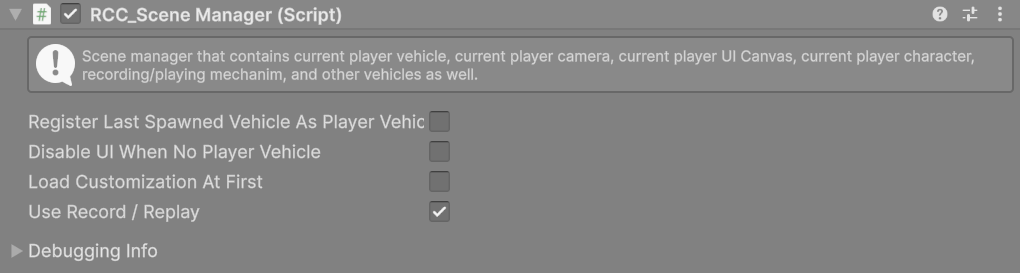
SpawnRCC(..., registerAsPlayerVehicle: true, ...)orRegisterPlayerVehicle(...)sets it.- The Scene Manager's Register Last Spawned Vehicle As Player Vehicle (on by default) also registers every vehicle that becomes active, unless it is externally controlled (AI, replay, network). Turn it off if you spawn non-player vehicles at runtime — otherwise the last one spawned becomes the player vehicle even with
registerAsPlayerVehicle: false.
Changed in V6: registering a different vehicle takes player control away from the previous one (
SetCanControl(false)), so only one car responds to your input. A previous vehicle that is externally controlled or driven byOverrideInputsis left alone. Registering an externally controlled vehicle (for example to point the camera at an AI car) takes control from nothing.
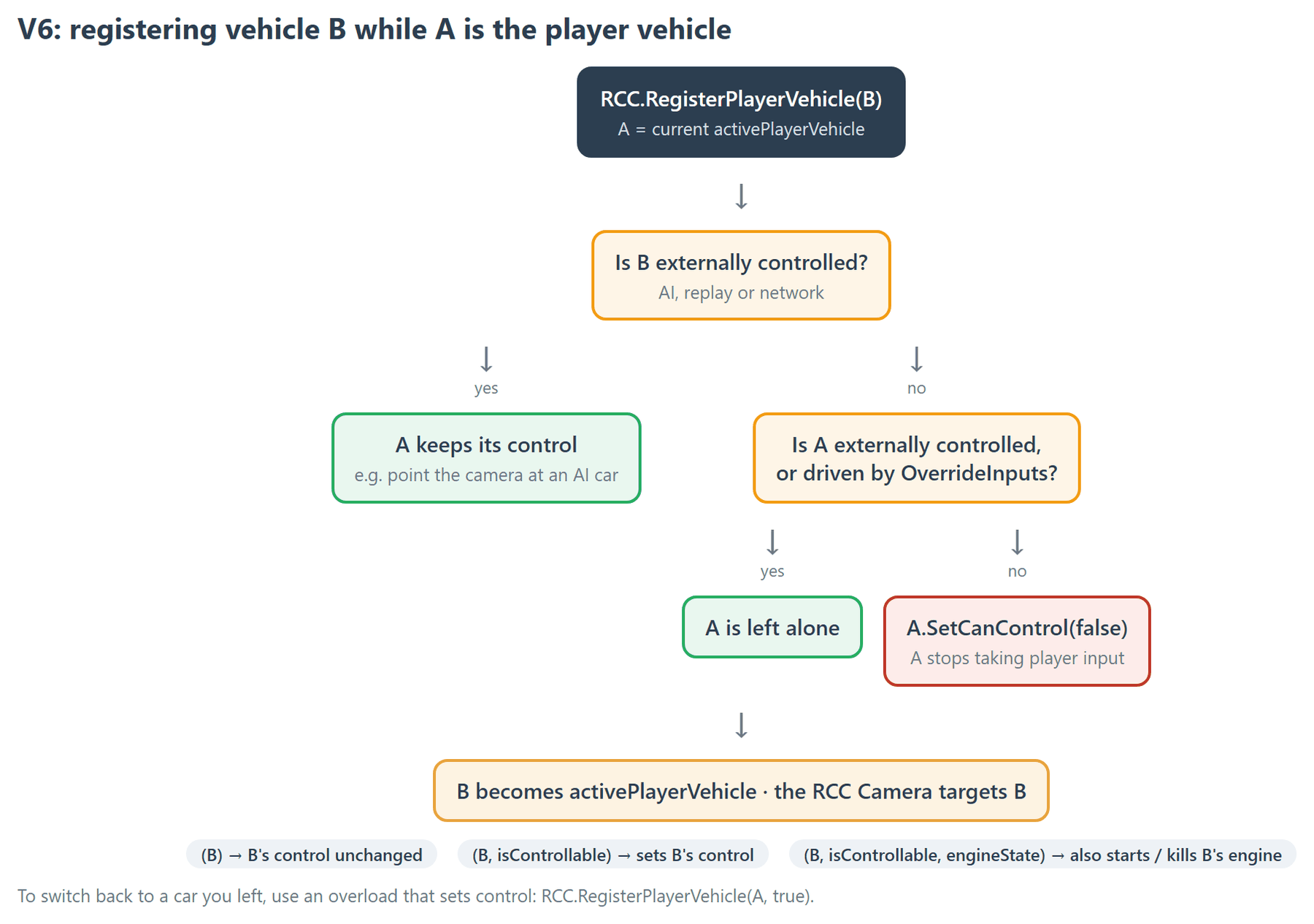
To switch the player back to a car you left earlier, use an overload that sets control — the one-argument version keeps it uncontrollable:
RCC.RegisterPlayerVehicle(otherCar, true);
Other useful Scene Manager members:
| Member | What it is |
|---|---|
activePlayerVehicle |
The current player vehicle, or null. |
activePlayerCamera |
The scene's RCC_Camera. |
allVehicles |
List<RCC_CarControllerV4> of vehicles registered with the Scene Manager, including AI. |
Control and Engine
RCC.SetControl(vehicle, false)— the vehicle ignores player input and holds its handbrake. Use it for countdowns, menus and cutscenes.RCC.SetEngine(vehicle, true)plays the starter sound and the engine runs after about 1 second. For an instant start callvehicle.StartEngine(true).
Behavior Presets
RCC.SetBehavior(index) selects a preset from RCC Settings. Shipped indices: 0 Balanced, 1 Racing, 2 Drift, 3 Semi Arcade, 4 Fun. The call turns on RCC Settings → Override Behavior, so the preset is applied even though the system ships off. Vehicles with Ignore Global Behavior Preset ticked are not affected. What each preset changes: Behavior Presets.
Camera
RCC.ChangeCamera() steps through TPS → FPS (hood) → WHEEL → FIXED → CINEMATIC → TOP, skipping modes that are turned off on the RCC Camera or whose camera is missing. It does nothing if the scene has no RCC Camera.

To jump straight to a mode:
RCC_SceneManager.Instance.activePlayerCamera.ChangeCamera(RCC_Camera.CameraMode.TOP);
This sets the mode without checking whether it is available. See Camera System.
Record and Replay
- Add a Scene Manager: Tools → BoneCracker Games → Realistic Car Controller → Create → Managers → Add RCC Scene Manager.
- Tick Use Record / Replay on it before entering Play mode. A recorder is attached to each vehicle when it spawns, so vehicles spawned while the option is off have none. A Scene Manager created automatically has it off.
- Call
RCC.StartStopRecord()to start, and again to stop and save. - Call
RCC.StartStopReplay()to play the recording back. During playback the vehicles are externally controlled; control returns when playback stops.
All three calls act on every recorded vehicle in the scene (AI included) and do nothing while Use Record / Replay is off. The default keys are listed in Input System.

Transport and Repair
Transport (both overloads) moves the vehicle with its Rigidbody, zeroes its velocity and that of its child Rigidbodies, releases the throttle, applies full brake, drops engine RPM to idle and sets the gear index to 0.
RCC.Transport(respawnPoint.position, respawnPoint.rotation);
Repair starts restoring a damaged vehicle: deformed meshes, wheel positions (and deflated tyres), detachable parts and broken lights. How fast it happens depends on the vehicle's Deformation Mode:
| Deformation Mode | Repair |
|---|---|
| Fast | Finishes in one frame. |
| Accurate | Blends back over several frames. |
vehicle.damage.repaired becomes true when the repair is complete. See Damage System.
using UnityEngine;

public class RepairZone : MonoBehaviour {

    private void OnTriggerEnter(Collider other) {

        RCC_CarControllerV4 vehicle = other.GetComponentInParent<RCC_CarControllerV4>();

        if (vehicle)
            RCC.Repair(vehicle);

    }

}
Useful Vehicle Members
All on RCC_CarControllerV4.
| Member | Type | What it does |
|---|---|---|
SetCanControl(bool state) / canControl |
method / bool | Player input on or off. |
SetExternalControl(bool state) / externalController |
method / bool | Marks the vehicle as driven by AI, replay or network, so player input is ignored. |
OverrideInputs(RCC_Inputs) / DisableOverrideInputs() |
methods | Drive the vehicle from your own script — see How To Override Inputs. |
StartEngine() |
method | Starts the engine with the starter sound (about 1 s). |
StartEngine(bool instantStart) |
method | true starts the engine immediately. |
KillEngine() |
method | Stops the engine. |
KillOrStartEngine() |
method | Toggles the engine. |
engineRunning |
bool | Whether the engine runs. |
GearShiftUp() / GearShiftDown() |
methods | Shift one gear. Shifting down from first selects reverse; shifting up from reverse selects first. |
GearShiftTo(int gear) |
method | Shift to a gear: 0 = first, -1 = reverse. Out-of-range values are ignored. |
currentGear |
int | Current gear, 0-based (0 = first). Reverse also uses 0 — check direction. |
direction |
int | 1 = forward, -1 = reverse, 0 = neutral. |
NGear |
bool | Neutral selected. |
automaticGear |
bool | Automatic gearbox on or off. |
speed |
float | Current speed, always in km/h (multiply by 0.62 for mph, as RCC's dashboard does). |
engineRPM |
float | Current engine RPM. |
isGrounded |
bool | At least one wheel touches the ground. |
lowBeamHeadLightsOn / highBeamHeadLightsOn / interiorLightsOn |
bool | Set to turn lights on or off. |
indicatorsOn |
RCC_CarControllerV4.IndicatorsOn |
Off, Right, Left or All (hazard). |
NoS |
float | Remaining nitrous, 0–100. |
Repair() |
method | Same as RCC.Repair(vehicle). |
DetachTrailer() |
method | Detaches the attached trailer, if any. |
Customizer |
RCC_Customizer |
The vehicle's customizer, or null — see Customization. |
RCC_CarControllerV4 car = RCC_SceneManager.Instance.activePlayerVehicle;

if (car) {

    car.lowBeamHeadLightsOn = true;
    car.indicatorsOn = RCC_CarControllerV4.IndicatorsOn.All;
    Debug.Log(car.speed.ToString("0") + " km/h, gear " + (car.currentGear + 1));

}
The full field list is in Vehicle Inspector Reference.
Reading Inputs
Current player input is in RCC_InputManager.Instance.inputs (throttleInput, brakeInput, steerInput, handbrakeInput, boostInput, clutchInput). GetInputs() returns nothing — read the field. See Input System.
Events
To react to spawns, player changes, collisions or input actions, subscribe to RCC_Events — see Events System.