How WheelColliders Work
This page covers how RCC drives Unity's WheelCollider, which values you can change, and which ones RCC overwrites while the game runs. It also covers the RCC Wheel Collider inspector and flat tires.
Quick Start
To change how a car grips and rides:
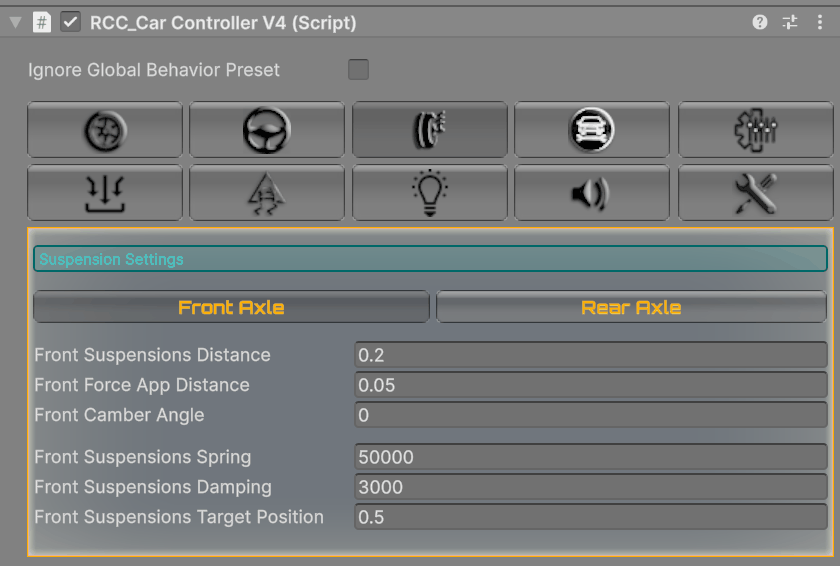
- Suspension: select the vehicle, open the Suspension tab, pick Front Axle or Rear Axle, and edit spring, damping and distance.
- Grip on every car and surface: open Tools → BoneCracker Games → Realistic Car Controller → Configure → Configure Ground Materials and change Forward Stiffness / Sideways Stiffness for a surface. See Ground Physics.
- Less grip on one wheel or axle: in the vehicle's Wheels tab, click Edit next to a WheelCollider, open Friction & Grip, and lower Forward Grip or Sideways Grip.
- Change the whole driving style: use a behavior preset. See Behavior Presets.
Warning: Raising Stiffness or Wheel Damping Rate on Unity's WheelCollider component does nothing. RCC overwrites both every physics step (see below).
How a Wheel Is Built
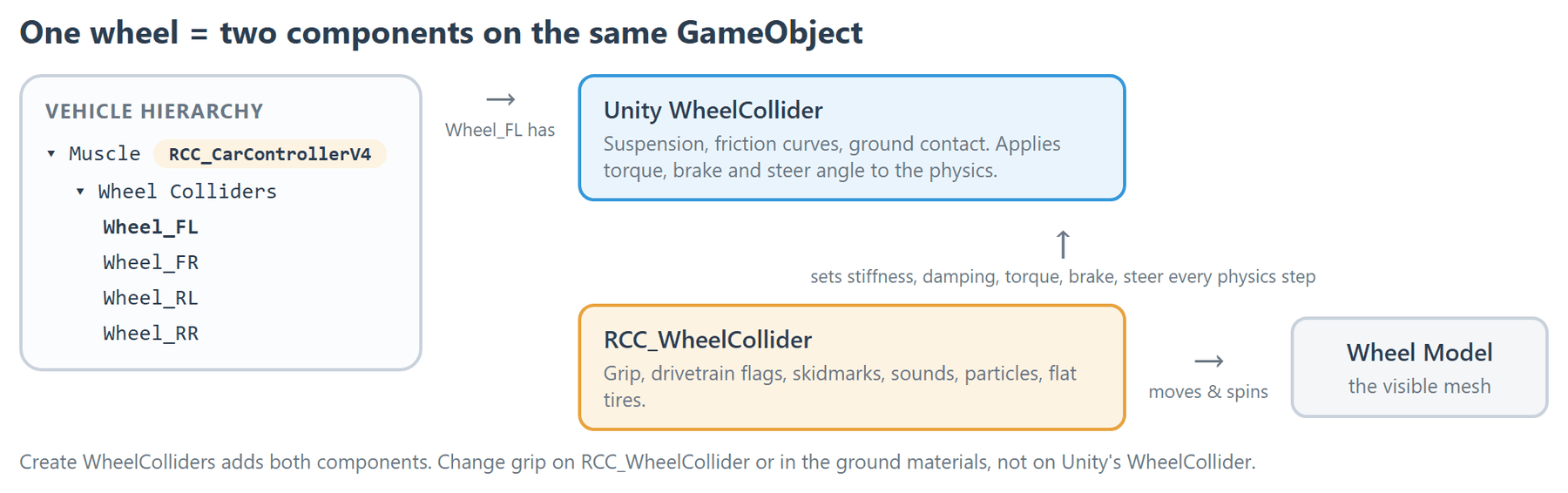
Each wheel is a child of the vehicle's Wheel Colliders object. It has two components: Unity's WheelCollider (suspension, friction, raycast) and RCC_WheelCollider (grip, drivetrain flags, skidmarks, sounds, particles, flat tires, wheel-model alignment). Create WheelColliders adds both. See How to Create New Vehicles.
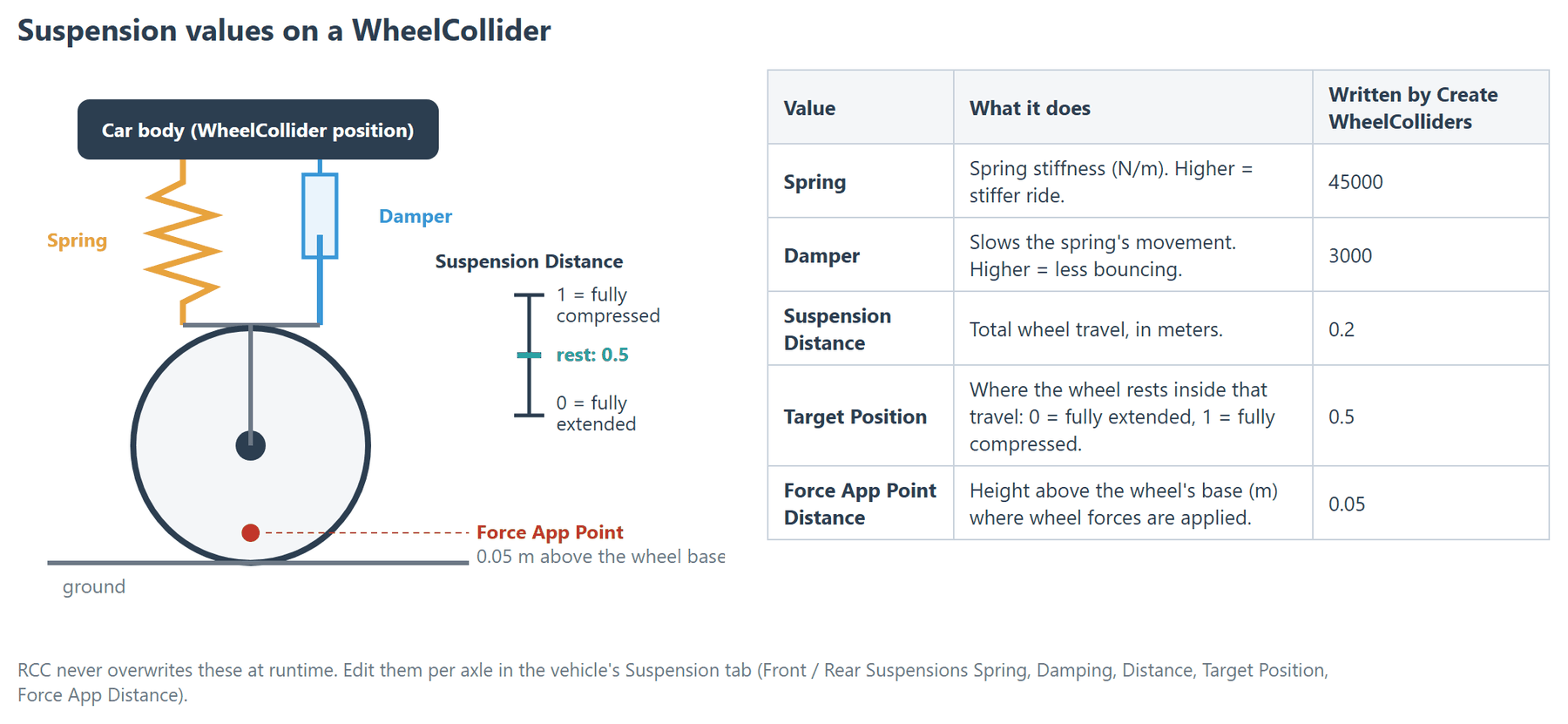
Create WheelColliders writes these values to each new WheelCollider. Most come from RCC_InitialSettings.asset (Tools → BoneCracker Games → Realistic Car Controller → Configure → Configure Initial Vehicle Setup Settings). Changing that asset affects only WheelColliders you create afterwards.
| WheelCollider value | Written value |
|---|---|
| Radius | From the wheel model's bounds |
| Suspension Spring → Spring | 45000 |
| Suspension Spring → Damper | 3000 |
| Suspension Spring → Target Position | 0.5 |
| Suspension Distance | 0.2 |
| Force App Point Distance | 0.05 |
| Mass | 40 |
| Wheel Damping Rate | 1 |
| Forward Friction (Extremum Slip / Value, Asymptote Slip / Value, Stiffness) | 0.375 / 1, 0.8 / 0.5, 1 |
| Sideways Friction (Extremum Slip / Value, Asymptote Slip / Value, Stiffness) | 0.325 / 1, 0.5 / 0.75, 1 |
What RCC Overwrites at Runtime
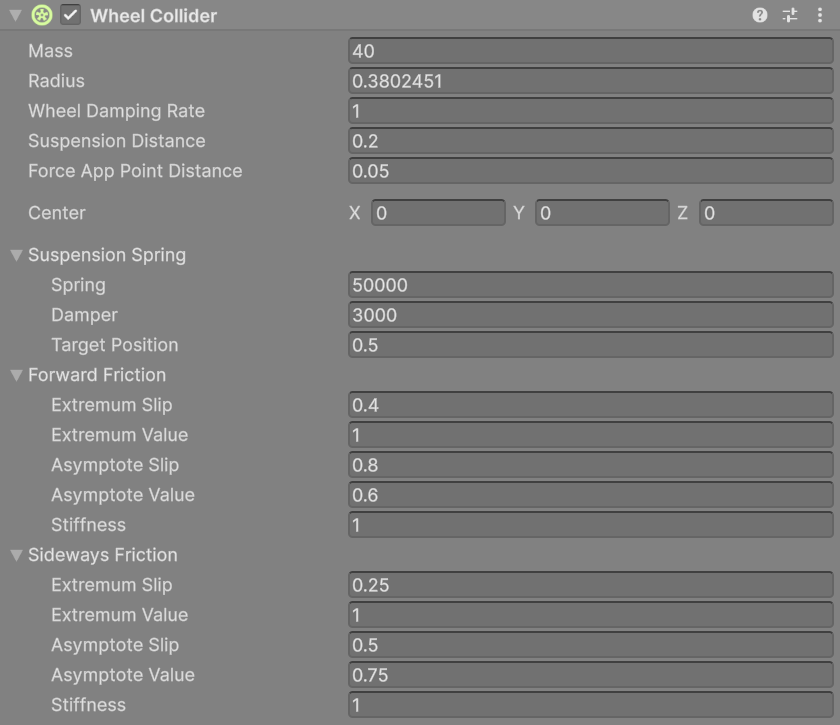
| WheelCollider value | In Play mode |
|---|---|
| Radius | Yours. A flat tire shrinks it (see Flat Tires). |
| Suspension Spring, Suspension Distance, Force App Point Distance | Yours. Edit them in the vehicle's Suspension tab. |
| Mass | Set once at start to Rigidbody mass ÷ 25 while RCC Settings → General Settings → Use Fixed WheelColliders is on (ships on). With the default 1370 kg car that is 54.8 kg per wheel. When it's off, your value is used. |
| Friction curve Extremum / Asymptote Slip and Value | Yours, unless the global behavior preset is on. Then RCC copies the preset's values at start and whenever the preset changes, except on vehicles with Ignore Global Behavior Preset on. |
| Friction Stiffness (forward and sideways) | Overwritten every physics step (formula below). |
| Wheel Damping Rate | Overwritten every physics step: the ground material's Damp × (1 − throttle). |
| Motor torque, brake torque, steer angle | Set every physics step from the driver's inputs. |
How grip is calculated
Every physics step, each wheel sets its friction stiffness from the surface under it:
- Forward stiffness = ground Forward Stiffness × Forward Grip
- Sideways stiffness = ground Sideways Stiffness × Sideways Grip × handbrake factor × traction helper factor
| Factor | Value |
|---|---|
| Handbrake factor | 0.75 while handbrake input is above 0.75 on a wheel with Can Handbrake; otherwise 1. |
| Traction helper factor | Front wheels only, with Traction Helper on (Stability tab). Lowered by Traction Helper Strength × yaw rate when the car slides against the steering; otherwise 1. |
| Flat tire | Both stiffnesses × Deflated Stiffness Multiplier. |
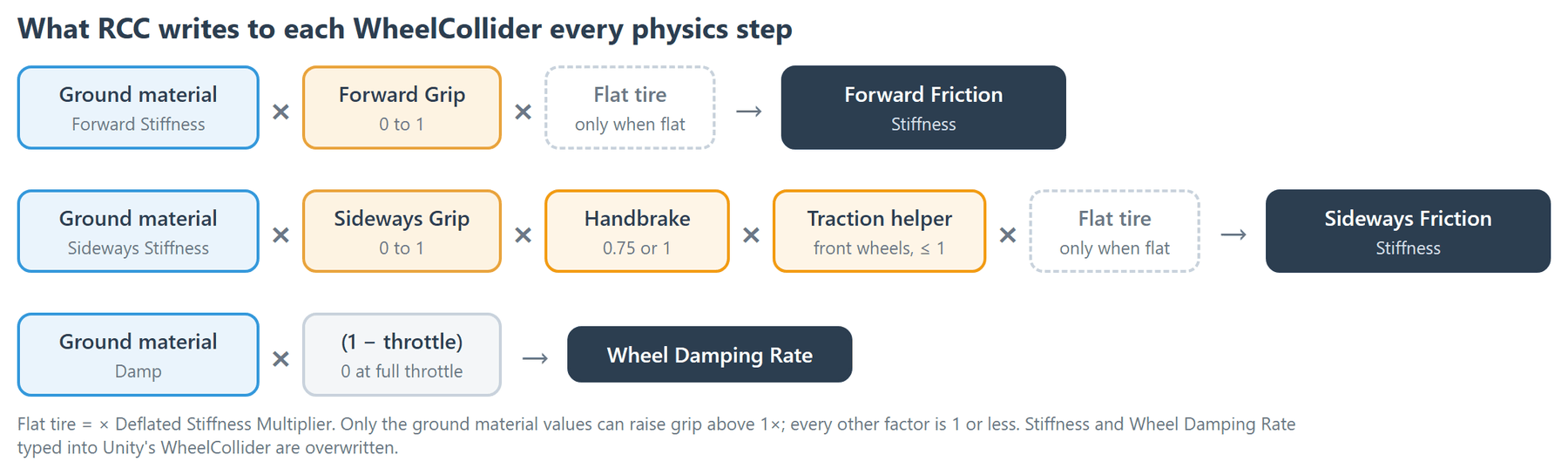
So the only ways to raise grip are the ground material's stiffness values. Forward Grip and Sideways Grip range from 0 to 1, so they can only lower grip.
Drift preset: grip that drops while sliding
Behavior presets with applyExternalWheelFrictions on also lower each wheel's friction curve while it slips. The only shipped preset with it on is Drift. While sliding, sideways grip falls to as low as 65%, and forward grip to as low as 75%. Front wheels lose more forward grip as they slide sideways. Rear wheels on an RWD car also get a sideways push at 0.8 throttle or more when sideways slip is 0.3 or more. All other presets leave the curves alone.
The Friction Curve
Unity models tire grip as a curve of slip (how much the tire slides) against force:
| Point | Meaning |
|---|---|
| Extremum Slip / Extremum Value | Where grip peaks, and how high the peak is. |
| Asymptote Slip / Asymptote Value | Where the tire has fully broken loose, and the grip left while sliding. |
| Stiffness | Multiplies the whole curve. RCC sets it for you (see above). |
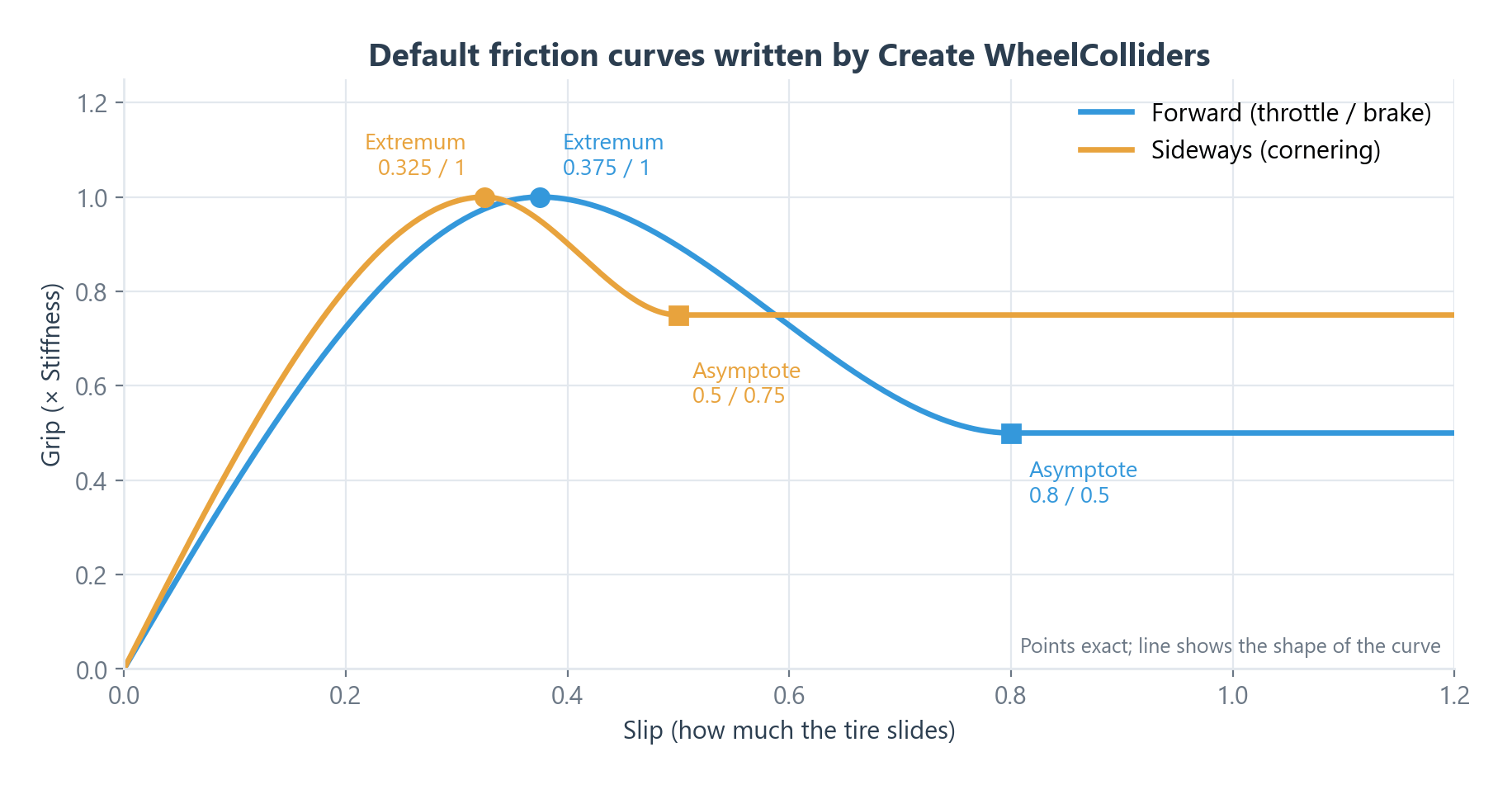
Forward friction handles throttle and braking. Sideways friction handles cornering. They are separate curves: a tire can spin forward while still gripping sideways.
RCC Wheel Collider Inspector
Select a wheel under Wheel Colliders, or click Edit next to it in the vehicle's Wheels tab.
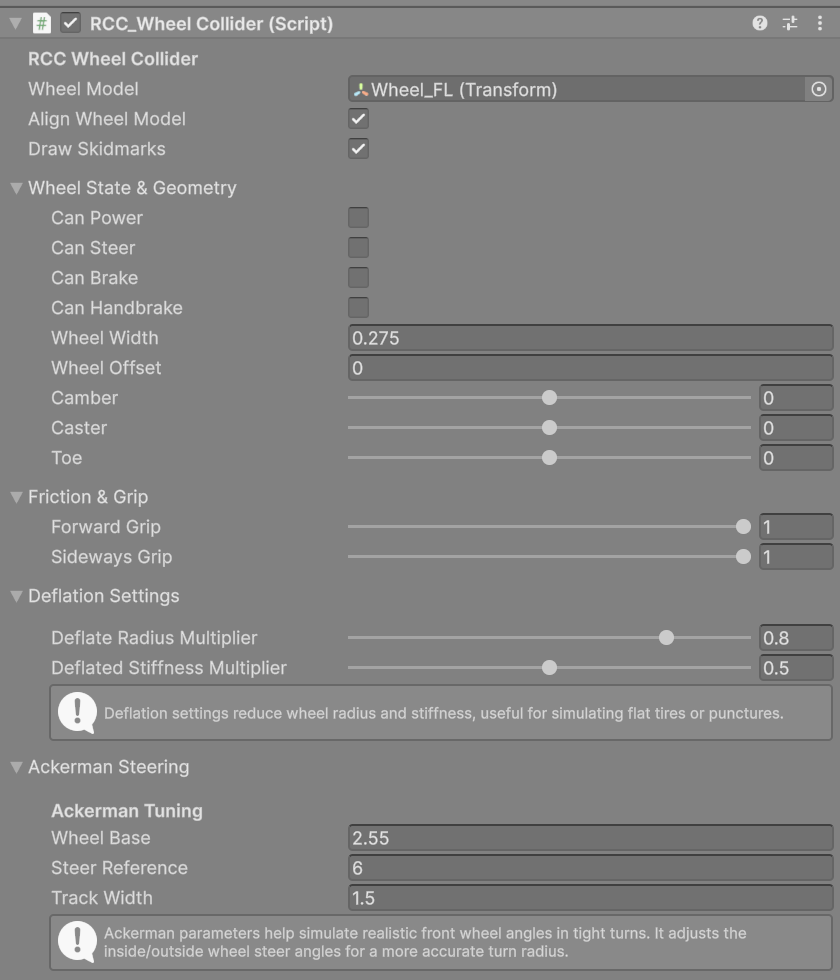
| Inspector label | What it does | Shipped default |
|---|---|---|
| Wheel Model | The visible wheel mesh. At start, RCC wraps it in a pivot at the center of its bounds. | — |
| Align Wheel Model | Moves and spins the wheel model to match the WheelCollider every frame. | On |
| Draw Skidmarks | This wheel leaves skidmarks when slipping. | On |
Wheel State & Geometry
| Inspector label | What it does | Range | Shipped default |
|---|---|---|---|
| Can Power | Receives engine torque. Torque is split evenly between powered wheels. | — | Set by RCC |
| Power Multiplier | Scales this wheel's engine torque. Negative reverses it. | −1 to 1 | 1 |
| Can Steer | Turns with steering input. | — | Set by RCC |
| Steering Multiplier | Scales this wheel's steering. Negative steers the other way (rear steer). | −1 to 1 | 1 |
| Can Brake | Receives brake torque. | — | Set by RCC |
| Braking Multiplier | Scales this wheel's brake torque. | 0 to 1 | 1 |
| Can Handbrake | Receives handbrake torque. | — | Set by RCC |
| Handbrake Multiplier | Scales this wheel's handbrake torque. | 0 to 1 | 1 |
| Wheel Width | Width of this wheel's skidmarks, in meters. | 0 or more | 0.3 |
| Wheel Offset | No effect in V6. | — | 0 |
| Camber | Tilts the wheel model inward or outward. Visual only. Also editable as Front / Rear Camber Angle in the Suspension tab. | −5 to 5 | 0 |
| Caster | Tilts the wheel model forward or backward. Visual only. | −5 to 5 | 0 |
| Toe | Added to the wheel's real steer angle, on every wheel. Positive points the wheel fronts inward. | −5 to 5 | 0 |
The four Can toggles are set by RCC unless Override All Wheels is on in the vehicle's Wheels tab:
| Wheels | Set at start | Set every physics step |
|---|---|---|
| Front | Can Steer, Can Brake, Braking Multiplier 1 | Can Power for FWD, AWD, BIASED |
| Rear | Can Handbrake, Can Brake, Braking Multiplier 0.75 | Can Power for RWD, AWD, BIASED |
The drivetrain is Wheel Type Choise (Engine & Gears tab). To set the toggles yourself, for example for a rear-steer forklift, turn on Override All Wheels.
Friction & Grip
| Inspector label | What it does | Range | Shipped default |
|---|---|---|---|
| Forward Grip | Multiplies forward (throttle / brake) grip. | 0 to 1 | 1 |
| Sideways Grip | Multiplies sideways (cornering) grip. | 0 to 1 | 1 |
Deflation Settings
| Inspector label | What it does | Range | Shipped default |
|---|---|---|---|
| Deflate Radius Multiplier | Radius of a flat tire, as a fraction of the original. | 0 to 1 | 0.8 |
| Deflated Stiffness Multiplier | Grip of a flat tire, as a fraction of normal. | 0 to 1 | 0.5 |
Ackerman Steering
RCC uses these values to give the left and right steered wheels different steer angles.
| Inspector label | What it does | Shipped default |
|---|---|---|
| Wheel Base | Approximate distance between the front and rear axles. | 2.55 |
| Steer Reference | Reference length used in the steer-angle calculation. | 6 |
| Track Width | Approximate distance between the left and right wheels. | 1.5 |
Skidmarks, Smoke and Tire Sounds
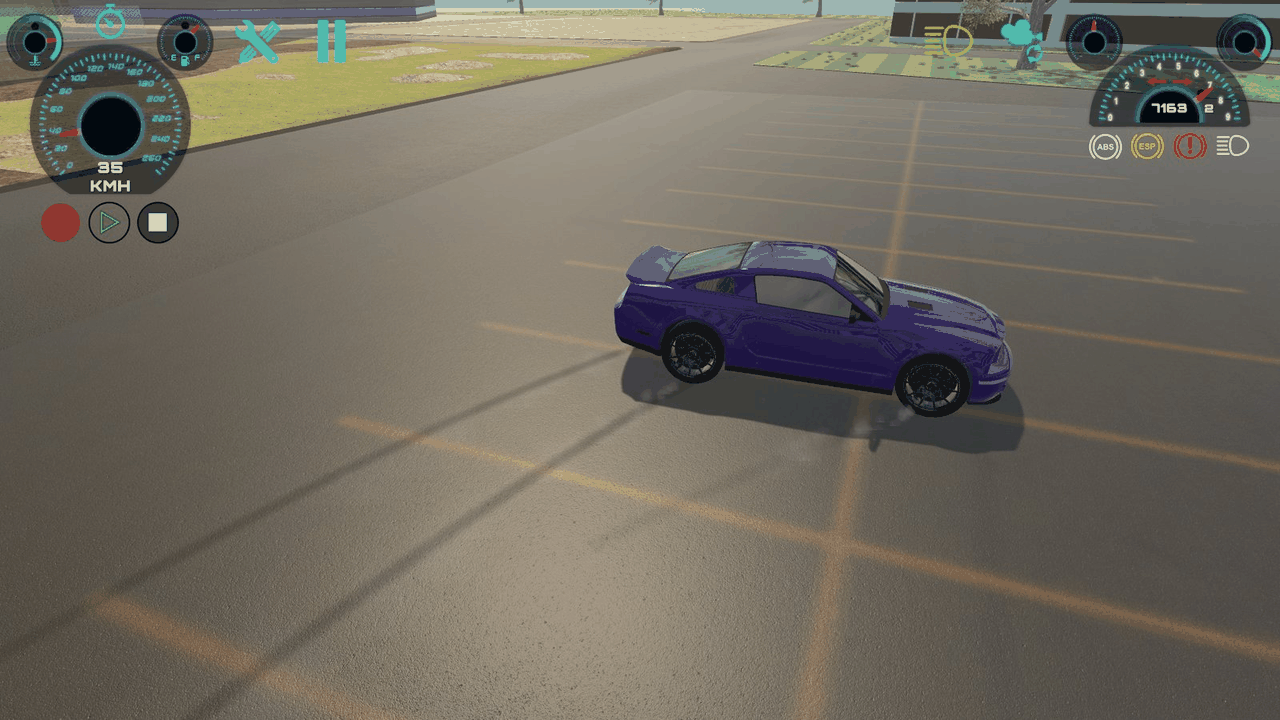
Each wheel reads the ground material under it. When the wheel's slip is above that material's Slip value:
- It plays the material's Wheel Sound. The volume rises with slip, up to the material's Volume.
- It emits the material's Wheel Particles.
- It draws skidmarks with the material's Wheel Skidmarks prefab, Wheel Width wide.
Terrains are matched by splatmap layer. See Ground Physics.
To turn these off for every vehicle, use RCC Settings → Optimization → Do Not Use Any Particle Effects and Do Not Use Skidmarks. How many marks stay on screen is set by Max Marks on each RCC_Skidmarks prefab. The shipped prefabs use 1024, and the oldest marks are overwritten first.
Changed in V6: Skidmarks no longer allocate memory every frame. A wheel that drives onto a different surface starts a new skidmark chain, so marks no longer disappear when wheels are on different surfaces.
Flat Tires
A tire goes flat only when it drives on a ground material with Deflate on (Configure Ground Materials), or when a script calls Deflate(). Collisions don't flatten tires. A flat tire:
- shrinks its radius by Deflate Radius Multiplier,
- multiplies its grip by Deflated Stiffness Multiplier,
- plays the deflate and flat-tire sounds and the deflate particles set in RCC Settings.
To fix a flat tire, call Inflate(). RCC.Repair(vehicle) also inflates the tires, but only when the vehicle has collision damage to repair.
using UnityEngine;

public class InflateAllTires : MonoBehaviour {

    public RCC_CarControllerV4 vehicle;

    public void InflateAll() {

        foreach (RCC_WheelCollider wheel in vehicle.GetComponentsInChildren<RCC_WheelCollider>())
            wheel.Inflate();

    }

}
Tuning Levers That Work
| Goal | Change this |
|---|---|
| More or less grip for every car on a surface | Ground material Forward / Sideways Stiffness (Ground Physics) |
| A different overall driving style | A behavior preset (Behavior Presets) |
| Less grip on one axle (for example, a looser rear end) | Forward Grip / Sideways Grip on those wheels |
| Stiffer or softer ride | Front / Rear Suspensions Spring in the Suspension tab |
| Less bouncing | Raise Front / Rear Suspensions Damping |
| More or less suspension travel | Front / Rear Suspensions Distance |
| Less body roll | Raise Anti Roll Front Horizontal / Anti Roll Rear Horizontal (Steering tab) |
| Less wheelspin | Turn on TCS, or turn on ESP to brake single wheels when the car under- or oversteers (Stability tab) (Vehicle Inspector Reference) |
| Wheels sink into the ground or float | Recreate the WheelColliders (How to Create New Vehicles) |
Performance
RCC_LODdoes not change wheels: wheel physics, wheel-model alignment and skidmarks keep running at every distance. What it does turn off is covered in Mobile Setup.- Do Not Use Any Particle Effects and Do Not Use Skidmarks (RCC Settings → Optimization) remove those costs for every vehicle.
- A lower Max Marks on the
RCC_Skidmarksprefabs uses less memory.