Events System
RCC_Events is a static class of C# events that RCC raises when vehicles spawn, collide or are destroyed, when AI and cameras are enabled, and when input actions fire. This page lists every event, who raises it and when.
Quick Start
- Create a script and add it to any GameObject in your scene.
- Subscribe in
OnEnablewith+=. - Unsubscribe in
OnDisablewith-=, using the same method. - Match each handler's parameters to the event's signature (see the table below).
using UnityEngine;

public class MyRCCEventListener : MonoBehaviour {

    private void OnEnable() {

        RCC_Events.OnRCCPlayerSpawned += OnVehicleSpawned;
        RCC_Events.OnRCCPlayerCollision += OnPlayerCollision;
        RCC_Events.OnGearShiftUp += OnGearUpPressed;

    }

    private void OnDisable() {

        RCC_Events.OnRCCPlayerSpawned -= OnVehicleSpawned;
        RCC_Events.OnRCCPlayerCollision -= OnPlayerCollision;
        RCC_Events.OnGearShiftUp -= OnGearUpPressed;

    }

    private void OnVehicleSpawned(RCC_CarControllerV4 vehicle) {

        Debug.Log("Vehicle spawned: " + vehicle.name);

    }

    private void OnPlayerCollision(RCC_CarControllerV4 vehicle, Collision collision) {

        Debug.Log(vehicle.name + " hit " + collision.gameObject.name + " at " + collision.relativeVelocity.magnitude.ToString("F1") + " m/s");

    }

    private void OnGearUpPressed() {

        Debug.Log("Gear up pressed");

    }

}
All Events
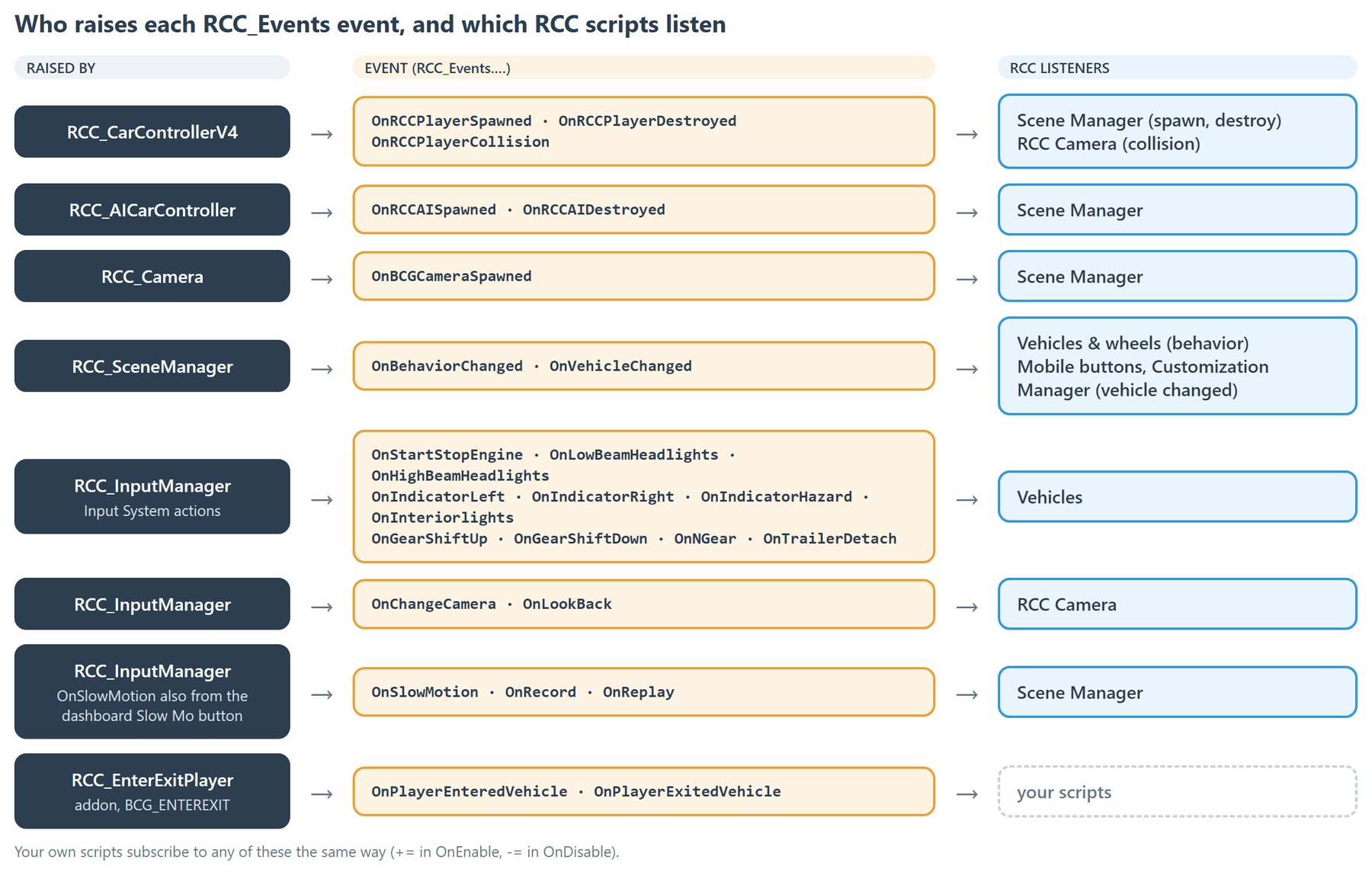
| Event | Signature | Raised by | When |
|---|---|---|---|
OnRCCPlayerSpawned |
(RCC_CarControllerV4 RCC) |
RCC_CarControllerV4 |
At the end of the frame any non-AI vehicle is enabled. Again on every re-enable. |
OnRCCPlayerDestroyed |
(RCC_CarControllerV4 RCC) |
RCC_CarControllerV4 |
In OnDestroy of every vehicle, AI included. |
OnRCCPlayerCollision |
(RCC_CarControllerV4 RCC, Collision collision) |
RCC_CarControllerV4 |
OnCollisionEnter of the active player vehicle, relative velocity ≥ 5 m/s. |
OnRCCAISpawned |
(RCC_AICarController RCCAI) |
RCC_AICarController |
The AI component's OnEnable. |
OnRCCAIDestroyed |
(RCC_AICarController RCCAI) |
RCC_AICarController |
The AI component's OnDisable (also runs when it is destroyed). |
OnBCGCameraSpawned |
(GameObject BCGCamera) |
RCC_Camera |
Every RCC_Camera OnEnable. Passes the camera's GameObject. |
OnBehaviorChanged |
() |
RCC_SceneManager |
RCC.SetBehavior(int) or RCC_SceneManager.SetBehavior(int). |
OnVehicleChanged |
() |
RCC_SceneManager |
Scene Manager Update sees a different active player vehicle. |
OnStartStopEngine |
() |
RCC_InputManager |
Start / Stop Engine input pressed. |
OnLowBeamHeadlights |
() |
RCC_InputManager |
Low Beam input pressed. |
OnHighBeamHeadlights |
() |
RCC_InputManager |
High Beam input pressed. |
OnChangeCamera |
() |
RCC_InputManager |
Change Camera input pressed. |
OnIndicatorLeft |
() |
RCC_InputManager |
Indicator Left input pressed. |
OnIndicatorRight |
() |
RCC_InputManager |
Indicator Right input pressed. |
OnIndicatorHazard |
() |
RCC_InputManager |
Hazard input pressed. |
OnInteriorlights |
() |
RCC_InputManager |
Interior Light input pressed. |
OnGearShiftUp |
() |
RCC_InputManager |
Gear Up input pressed. |
OnGearShiftDown |
() |
RCC_InputManager |
Gear Down input pressed. |
OnNGear |
(bool state) |
RCC_InputManager |
Neutral input: true on press, false on release. |
OnSlowMotion |
(bool state) |
RCC_InputManager, RCC_UI_DashboardButton |
Slow Motion input: true on press, false on release. Also the dashboard Slow Mo button (toggles). |
OnRecord |
() |
RCC_InputManager |
Record input pressed. |
OnReplay |
() |
RCC_InputManager |
Replay input pressed. |
OnLookBack |
(bool state) |
RCC_InputManager |
Look Back input: true on press, false on release. |
OnTrailerDetach |
() |
RCC_InputManager |
Trailer Detach input pressed. |
OnPlayerEnteredVehicle |
(RCC_EnterExitPlayer player, RCC_EnterExitVehicle vehicle) |
RCC_EnterExitPlayer |
Character gets in, after the vehicle is registered as the player vehicle. Enter-Exit addon only. |
OnPlayerExitedVehicle |
(RCC_EnterExitPlayer player, RCC_EnterExitVehicle vehicle) |
RCC_EnterExitPlayer |
Character gets out, after the vehicle is de-registered. Enter-Exit addon only. |
Every event has a matching public Event_On… method on RCC_Events that raises it, for example RCC_Events.Event_OnRCCPlayerSpawned(vehicle).
Timing Notes
Vehicle events
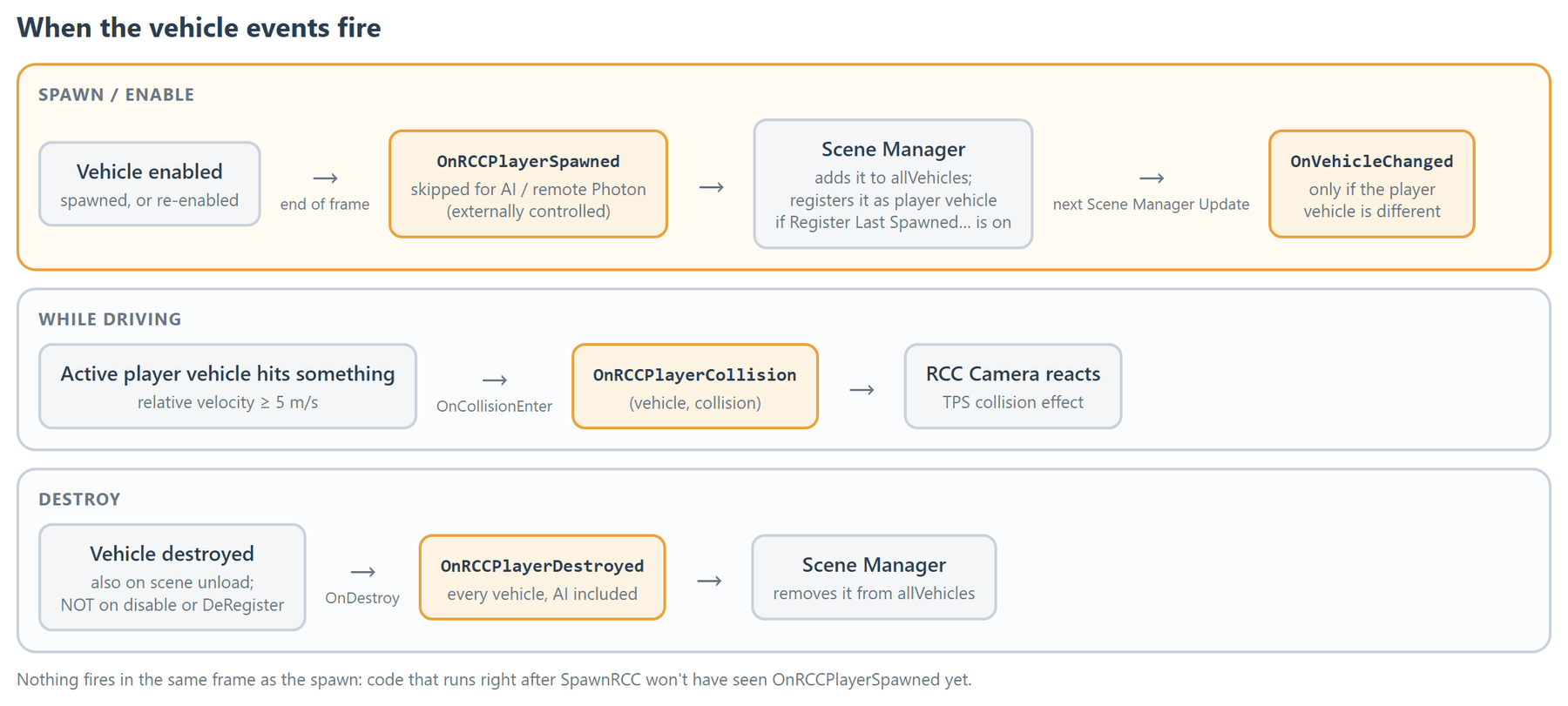
OnRCCPlayerSpawnedfires for any vehicle that is not externally controlled, not only the player's. AI vehicles and remote Photon vehicles are skipped.- The Scene Manager listens to it. If Register Last Spawned Vehicle As Player Vehicle is on (the default), it registers that vehicle as the player vehicle. No "Player" tag is involved.
- It is not raised immediately. Code that runs right after spawning a vehicle won't see it yet.
OnRCCPlayerDestroyedis not raised byRCC.DeRegisterPlayerVehicle()or by disabling a vehicle. It is raised only when a vehicle is destroyed, including during scene unload.OnRCCPlayerCollisiononly fires for the vehicle inRCC_SceneManager.activePlayerVehicle, on contacts with a relative velocity of 5 m/s or more.
Scene events
OnVehicleChangedhas no parameter. ReadRCC_SceneManager.Instance.activePlayerVehiclein your handler.- It is detected in the Scene Manager's
Update, so it can arrive one frame after the change. It also fires for the first player vehicle. - It does not fire when the player vehicle is cleared.
RCC.SetBehavior(int)turns the global behavior preset on before raisingOnBehaviorChanged. See Behavior Presets.
Input events
- They come from the Input System actions (keyboard, gamepad, wheel). See Input System for the bindings.
OnGearShiftUp/OnGearShiftDownfire only on gear input. Automatic gear changes, the dashboard gear buttons andGearShiftUp()/GearShiftDown()calls do not raise them.- Dashboard UI buttons act on the vehicle directly and do not raise input events. The Slow Mo button is the exception.
Changed in V6: the dashboard Slow Mo button raises
OnSlowMotion. The Scene Manager restores the time scale the game was running at, and slow motion no longer carries into the next scene.
Enter-Exit events
OnPlayerEnteredVehicle and OnPlayerExitedVehicle exist only when the BCG_ENTEREXIT define is set, which importing the Enter-Exit addon does. Wrap any code that uses them in #if BCG_ENTEREXIT. See Addon Packages.
Pitfalls
- Always unsubscribe. The events are static. A handler you never remove keeps running after its object is destroyed and throws errors. Subscribing twice runs it twice.
- Late subscribers miss past events. If a vehicle spawned before your script was enabled, you won't get
OnRCCPlayerSpawnedfor it. ReadRCC_SceneManager.Instance.activePlayerVehicleinOnEnableas well. - Nothing fires the same frame.
OnRCCPlayerSpawnedcomes at the end of the frame, andOnVehicleChangedin the next Scene ManagerUpdate. RCC_SceneManager.Instancecreates a Scene Manager if the scene has none. Don't read it inOnDisableorOnDestroy. Unsubscribing never needs it.