RCCP 2 architecture
Goal: Learn where the parts of RCCP are and how they operate together. Read the short overview first. The implementation tables are for developers who extend RCCP.
To build a vehicle in the Inspector, use Vehicle Setup. To tune the handling, use How the Car Drives.
Short overview
RCCP core types use the BoneCrackerGames namespace. These types compile in the predefined Assembly-CSharp assembly.
The installer has its own Editor assembly. Existing specialized namespaces keep their names.
Add using BoneCrackerGames; to scripts that call the core API. Read the scripting guide.
| Part | Description |
|---|---|
| Vehicle root | The top object of one vehicle. The root holds the main controller and the Rigidbody. |
| Module | A component with one function, for example engine sound or steering input. |
| Scene manager | The scene record of the vehicle that the player drives. |
| Shared settings | Project-wide defaults. Runtime copies let you change them in Play Mode. |
| Public API | Methods that your script calls to make RCCP do an action. |
| Event | A notification that your script receives when something occurs. |
Obey these three rules when you write code:
- Get modules through the vehicle controller, for example
car.Engine. Do not use their names or their positions in the Hierarchy. - Drive through the input API. Then the drivetrain, the tires and the assists can process the input.
- Use runtime settings copies for changes that must not stay after Play Mode stops.
Check: You know if your change is for one vehicle, for the scene, or for the shared settings. Use the sections below for the implementation details.
Choose a topic
- Components and their base types
- Find a module
- Engine-to-wheel flow
- Execution order
- Wheel solver ownership
- Listen for events
- Settings assets and runtime copies
The component model
A vehicle has one RCCP_CarController on the root GameObject and subsystem components on child objects. Each subsystem finds the controller above it and registers itself in a named slot. This lookup is automatic. You must still assign the wheels and connect the differentials to the axles.
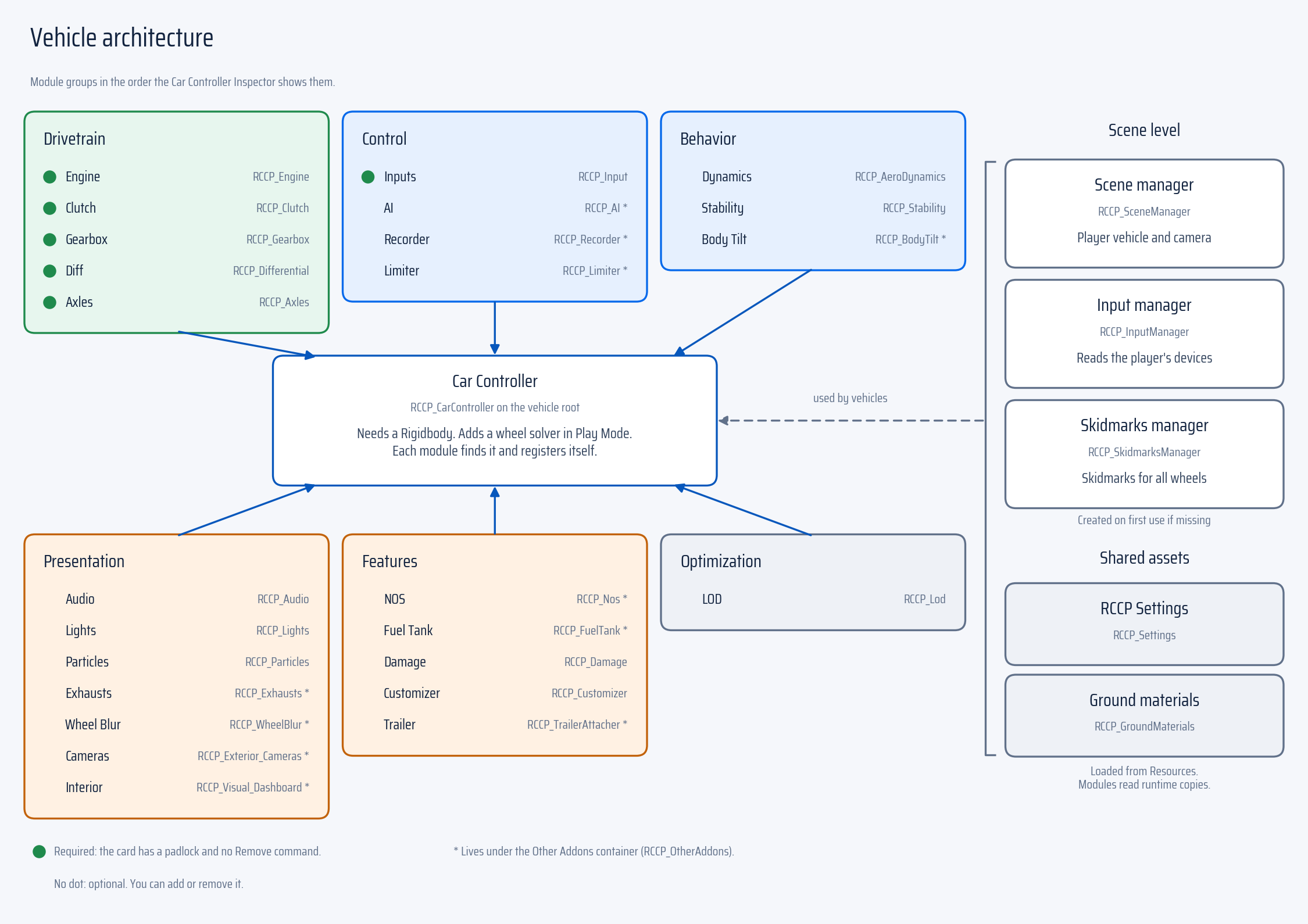
Base classes give shared behavior to the concrete components. You add the concrete component, for example an Engine. You do not add an abstract base class, for example RCCP_Component.
Developer detail: base types
| Base class | Used by | Function |
|---|---|---|
RCCP_GenericComponent |
Components that are not vehicle parts, for example managers, cameras and waypoints | Cached RCCPSettings, RCCPGroundMaterials, RCCPSceneManager |
RCCP_Singleton<T> (extends RCCP_GenericComponent) |
RCCP_SceneManager, RCCP_InputManager, RCCP_SkidmarksManager, RCCP_CinematicCamera, RCCP_CrashCamera, RCCP_FixedCamera, RCCP_PhotoMode |
An Instance accessor. The accessor finds the instance in the scene, or creates a GameObject for a new instance. |
RCCP_MainComponent |
RCCP_CarController |
[SelectionBase], [DisallowMultipleComponent], the cached Rigid, and all subsystem slots |
RCCP_Component (implements IRCCP_Component) |
All vehicle subsystems | Automatic discovery of the parent controller, and Register() |
RCCP_UpgradeComponent (extends RCCP_Component) |
Customization parts | Loadout, Save() and Load() through the RCCP_Customizer of the vehicle |
RCCP_UIComponent |
Canvas components | Cached RCCPSettings and RCCPSceneManager |
RCCP_Component does not have the [DisallowMultipleComponent] attribute. Unity applies this attribute to a type and to all its subtypes. If a base class has this attribute, Unity does not let two different subclasses be on one GameObject. Then AddComponent returns null with no error. Thus, only the concrete components that must be one per GameObject have the attribute.
Component registration
RCCP_Component.CarController is a lazy property. On first access, the property calls GetComponentInParent<RCCP_CarController>(true). If the property finds a controller, the property calls Register(carController, this).
Register is a type switch. Register puts the component in the matching slot on the controller:
Developer detail: registration table and hierarchy layouts
| Component | Slot |
|---|---|
RCCP_Engine |
CarController.Engine |
RCCP_Clutch |
CarController.Clutch |
RCCP_Gearbox |
CarController.Gearbox |
RCCP_Differential |
Calls CarController.UpdateDifferentials(), which scans again into Differentials |
RCCP_Axles |
CarController.AxleManager |
RCCP_Axle |
Added to AxleManager.Axles |
RCCP_WheelCollider |
No slot. Get a wheel through its axle. |
RCCP_WheelSolver |
CarController.WheelSolver |
RCCP_AeroDynamics |
CarController.AeroDynamics |
RCCP_Audio |
CarController.Audio |
RCCP_Input |
CarController.Inputs |
RCCP_Lights |
CarController.Lights |
RCCP_Light |
Lights.RegisterLight(...) |
RCCP_Stability |
CarController.Stability |
RCCP_Damage |
CarController.Damage |
RCCP_DamageMechanics |
CarController.DamageMechanics |
RCCP_DeformationSolver |
CarController.DeformationSolver |
RCCP_Particles |
CarController.Particles |
RCCP_Customizer |
CarController.Customizer |
RCCP_Lod |
CarController.LOD |
RCCP_Modules |
CarController.ModulesManager |
RCCP_OtherAddons |
CarController.OtherAddonsManager |
Eleven addon components register one level lower, in OtherAddonsManager:
| Addon component | Slot on OtherAddonsManager |
|---|---|
RCCP_Recorder |
.Recorder |
RCCP_Exhausts |
.Exhausts |
RCCP_Limiter |
.Limiter |
RCCP_Nos |
.Nos |
RCCP_TrailerAttacher |
.TrailAttacher |
RCCP_Visual_Dashboard |
.Dashboard |
RCCP_Exterior_Cameras |
.ExteriorCameras |
RCCP_AI |
.AI |
RCCP_WheelBlur |
.WheelBlur |
RCCP_FuelTank |
.FuelTank |
RCCP_BodyTilt |
.BodyTilt |
Two failure conditions are important:
- If
OtherAddonsManageris missing, an addon component disables itself. The component does not throw an exception. An axle without an axle manager also disables itself. - If no parent has an
RCCP_CarController, the component logs an error and disables itself.RCCP_Light,RCCP_TrailerAttacherandRCCP_WheelSlipParticlesare exceptions. These components can operate outside a vehicle.
Supported hierarchy layouts
Vehicles that the current version creates keep all modules in one RCCP_Modules container under the root. Older vehicles keep the modules directly under the root. RCCP_Modules holds no settings and runs no code. The container is only for organization. The container has no execution order because no component registers in the container.
A module can be at either depth. Thus, do not find a module by its path. transform.Find("RCCP_Engine") finds the engine on a flat vehicle, but returns null on a grouped vehicle. Read the slot (carController.Engine) instead. Do not use an unlimited GetComponentInChildren<T>() search. The search can return a spare part that RCCP_Customizer keeps on the vehicle but has not installed.
The slot getters use ResolveModule<T>(). This method searches two levels below the vehicle root. If the container exists, the method then searches two levels below the container. Thus, both layouts operate the same.
Torque flow
Power goes through five stages. The engine, the clutch and the gearbox each send an RCCP_Output object to the next stage. The object contains two floats: NM (torque in newton-meters) and RPM. The differential then sends two torque values to its axle, one for each side.
| Stage | Component | Function |
|---|---|---|
| 1 | RCCP_Engine |
Makes torque from RPM and throttle, then invokes outputEvent |
| 2 | RCCP_Clutch |
ReceiveOutput stores the output. The clutch FixedUpdate applies clutch slip and sends the output again. |
| 3 | RCCP_Gearbox |
Multiplies the torque by the current gear ratio and sends the output again |
| 4 | RCCP_Differential |
Divides the torque between left and right, and calls RCCP_Axle.ReceiveOutput(left, right) |
| 5 | RCCP_Axle |
Adds the torque of each wheel to the wheel accumulators |
Each stage stores the value that it receives. The stage then processes the value in its own FixedUpdate (the Unity physics update). RCCP runs these updates in sequence from the engine to the wheels. Thus, the torque can go through the full chain in one physics step.
RCCP_Differential sets isPower on its connected axle. Do not set this flag yourself. You set the other three axle flags (isSteer, isBrake and isHandbrake) on each axle.
Developer detail: wheel torque
Wheel torque accumulators
RCCP_WheelCollider has additive accumulators: AddMotorTorque, AddBrakeTorque, AddHandbrakeTorque and AddEngineBrakeTorque. Physics subsystems add torque before the FixedUpdate of the wheel. The wheel prepares the drive, brake and friction values for the solver. Then the wheel clears the accumulators for the next step.
The axle fills the accumulators at order -2. Stability changes them at -1. The wheel uses them at 0, and the solver runs at 1. Keep this order. Then the solver receives the torque and the stability changes of the current step.
For legacy aliases and applied-torque readouts, refer to the wheel API.
Wheel solver operation
If RCCP_WheelSolver is missing, the controller adds it at runtime before the first wheel step. The solver collects the wheel configuration and the inputs of each vehicle.
RCCP_WheelSolverWorld steps all registered vehicles in one batch for each fixed step. The first solver call starts the batch. After the jobs complete, the main thread applies the impulses and publishes the wheel readouts.
If BCG_RCCP_BURST is defined, the jobs use Burst compilation. If the symbol is not defined, the same code runs as managed code.
The wheel API gives the configuration and compatibility limits:
- RCCP-owned settings and supported setters.
- Version-0 conversion and saved wheel data.
- Substep selection and obsolete profiles.
- Published contact, force and slip readouts.
Execution order
Each class that needs a specific order has a [DefaultExecutionOrder] attribute. Thus, the order applies also when the editor helper is not in the project.
After a domain reload or a script import, the RCCP editor startup (RCCP_InitLoad) calls RCCP_ScriptExecutionOrderManager.ValidateExecutionOrders(). This method writes the same values into the MonoImporter of each script in its list. Thus, the Project Settings list agrees with the attributes. RCCP_WheelBlur and RCCP_TireDeformation use only the attribute.
Developer detail: execution-order table
| Order | Components | Reason |
|---|---|---|
| -50 | RCCP_SceneManager, RCCP_InputManager, RCCP_SkidmarksManager |
Singletons must exist before other components read them |
| -13 | RCCP_ReplayDirector |
Sets the recorded poses and sends the recorded input before all input writers |
| -12 | RCCP_AIDynamicObstacleAvoidance |
Calculates the steer and brake corrections before the AI uses them at -11 |
| -11 | RCCP_AI, RCCP_Recorder |
Store override requests. The input component processes these requests in Update. |
| -10 | RCCP_CarController |
Main controller |
| -8 | RCCP_Limiter, RCCP_DamageMechanics |
Limit the engine fuel (Engine.LimitFuel) and write Engine.damageTorqueMultiplier before the engine reads them |
| -7 | RCCP_Engine |
Starts the torque chain |
| -6 | RCCP_Clutch |
|
| -5 | RCCP_Gearbox, RCCP_Axles, RCCP_Lights, RCCP_Exhausts, RCCP_OtherAddons |
Parent containers must register before their child components. The containers have no FixedUpdate. Thus, the gearbox can share this order. |
| -4 | RCCP_Differential |
|
| -3 | RCCP_AeroDynamics |
Writes Rigidbody.centerOfMass and linearDamping before the suspension solver reads them |
| -2 | RCCP_Axle |
Fills the wheel accumulators |
| -1 | RCCP_Stability, RCCP_ReplayLatePhase |
RCCP_Stability changes the accumulators (ABS, ESP and TCS cuts). RCCP_ReplayLatePhase runs after the controller and engine writes, and before the wheel and audio reads. |
| 0 | RCCP_WheelCollider |
Prepares the solver inputs and clears the accumulators |
| 1 | RCCP_WheelSolver |
Steps all registered vehicles, applies the impulses and publishes the wheel readouts |
| 5 | RCCP_Camera |
Runs after the vehicle moves |
| 6 | RCCP_WheelBlur |
Visual wheel blur |
| 10 | RCCP_Customizer, RCCP_Lod, RCCP_BodyTilt, RCCP_DeformationSolver |
Visual and late work. The deformation solver writes only render meshes. |
| 100 | RCCP_TireDeformation |
Visual tire compression on the LOD0 wheel meshes |
Components that keep the default order 0 do not need a specific order. Examples are RCCP_Audio, RCCP_DetachablePart and RCCP_CrashCamera.
The order above controls the physics chain. Usual override requests also go through the Update processing of the input component.
If you write an override in FixedUpdate, the override does not reach the controller in the same physics step.
If several physics steps run before Update, only the last override request reaches the input processing.
Replay uses its own input lock and its own processed-input path.
Execution order for your own component
| Your component | Order |
|---|---|
Sends input through Inputs.OverrideInputs(...) |
Use Update at -11 or earlier. Do not expect delivery in the same step from FixedUpdate. |
| Adds a new physics subsystem | Read the accumulator order above. For usual driving scripts, use the input API. |
| Reads the published wheel state of this step and writes no physics | Greater than 1. Order 0 reads the previous publication. Order 1 does not make sure that the solver runs first. |
Events
Use events when your script must react to RCCP. For example, a race manager can listen for a vehicle spawn. A score system can listen for an impact.
Subscribe in OnEnable and unsubscribe in OnDisable. The events are static. If you do not remove a subscription, the subscription can stay after its scene object is destroyed.
Check: When you enable your component, the component adds its listener one time. When you disable the component, the component removes that listener. The API Reference has the subscription example and the full tables of events and signatures.
Vehicle and AI lifecycle notifications are separate. Collision notifications are also different. Some notifications occur on each contact. The gameplay-impact event ignores small or repeated hits. Select the event from its description in the reference, not only from its name.
Settings assets and runtime copies
RCCP_Settings, RCCP_GroundMaterials and RCCP_ChangableWheels are ScriptableObjects that RCCP loads from Resources. .Instance gives the asset on disk.
CAUTION: Do not write to
.Instancein Play Mode..Instanceis the asset on disk. The change stays after Play Mode stops.
On first access, RCCP_RuntimeSettings creates clones with ScriptableObject.Instantiate. The base-class accessors RCCPSettings, RCCPGroundMaterials and RCCPChangableWheels use these copies. Use .Instance only in editor code. Each Play session clears the static clone references, also when domain reload is disabled.
RCCP_RuntimeSettings.Clear() also clears these references. The next access creates new copies. But components that cached a copy keep their old reference. To reset shared settings in Play Mode, update the existing clone. Then the cached references stay valid.
The scene singletons operate differently. RCCP_SceneManager.Instance, RCCP_InputManager.Instance and RCCP_SkidmarksManager.Instance search the scene first. If the search finds no instance, the accessor creates a GameObject and adds the component. The GameObject name is the full type name, for example BoneCrackerGames.RCCP_SceneManager.
Read next
- The Public API: the facade methods that spawn, control and transport vehicles. Use these methods before you use a component directly.
- Control Vehicles from Code: a scripted driving example and the rules for input ownership.
- Field Reference: all settings on all components, with their defaults and ranges.
- How the Car Drives: the same drivetrain chain, described for tuning, not for code.